
Master sales process automation with this practical playbook. Map workflows, design handoffs, and scale predictable revenue for B2B and SaaS growth.
More automation doesn't automatically create more revenue. It can just make a broken sales process move faster, fill the CRM with unreliable records, and send prospects messages no rep would willingly write. The opportunity in sales process automation is narrower and more valuable: remove friction from the moments that slow pipeline movement, then keep a human involved wherever judgment, trust, or negotiation matters.
That distinction changes the implementation plan. A sequencer is useful, but it won't fix delayed lead routing. A lead-scoring model is helpful, but it won't rescue inconsistent definitions of a qualified opportunity. Automation creates impact when clean data, clear ownership, and useful triggers work together.
Sales process automation has been developing for decades, not appearing suddenly with generative software. ACT! became one of the first commercial contact-management products for PCs in 1986, Siebel Systems helped move sales force automation into the enterprise in 1993, and Salesforce launched a cloud-based CRM in 1999, shifting automation from installed software to browser-based platforms. Oracle's acquisition of Siebel Systems for $5.85 billion in 2006 signaled the scale of enterprise demand for automated sales operations and customer data management, as documented in this history of CRM development.
Those milestones matter because they show that automation isn't a single feature. It sits inside a broader operating system for customer data, workflows, forecasting, routing, and handoffs. Modern teams shouldn't ask, “Which task can software perform?” They should ask, “Where does pipeline momentum leak, and what combination of rules, data, and human action closes that gap?”
McKinsey reported that only one in four companies had automated at least one sales process, which shows that most organizations remain early in the journey despite the category's long history (McKinsey sales automation research). The implication is practical: teams don't need to automate everything before they can create value. They need to choose a small number of high-friction workflows and make them dependable.
A rep who no longer types the same CRM fields after every call has more capacity. That benefit is visible, but it isn't the whole return. Consistent follow-up timing, faster lead assignment, complete activity history, and reliable stage movement create a more predictable operating rhythm across the team.
Independent benchmark reporting cites a 14.5% average productivity increase for organizations using sales force automation software and about six hours saved per rep per week through automated manual tasks (sales automation benchmark data). Those figures shouldn't become a promise for every rollout. They do support a better measurement question: how much time is released, and does that capacity improve response speed, pipeline hygiene, or revenue-producing activity?
Practical rule: Automate the administrative steps around a valuable conversation, not the conversation itself.
Teams evaluating how to implement sales process automation should start with workflow design rather than software selection. A useful process map identifies which event triggers an action, which system owns the record, which person receives the task, and what happens when the expected condition isn't met. This approach also complements guidance on the benefits of process automation, especially when the objective is operational consistency rather than task volume.
A high-volume sequence can increase activity while decreasing relevance. In contrast, orchestration connects signals to context. A pricing-page visit might prompt account research, not an indiscriminate message. A completed demo might create a follow-up task with call notes attached, rather than another generic email.
The strongest sales teams use automation to protect human attention. Reps receive fewer administrative interruptions and better context for the moments that require judgment. That is the difference between automating tasks and engineering a sales system.
Before creating a rule, map the actual sales motion. Documentation from leadership often describes the intended process, while reps operate through workarounds, spreadsheets, inbox searches, and memory. Those workarounds reveal where automation will help, but they also expose processes that need redesign first.
Start with a single path from lead capture to closed won. Follow a real opportunity and record every event, owner, system, decision, and delay. Shadow a rep through the work rather than relying only on interviews. A rep may say that lead routing is automatic, while the calendar shows repeated manual checks and reassignment messages.
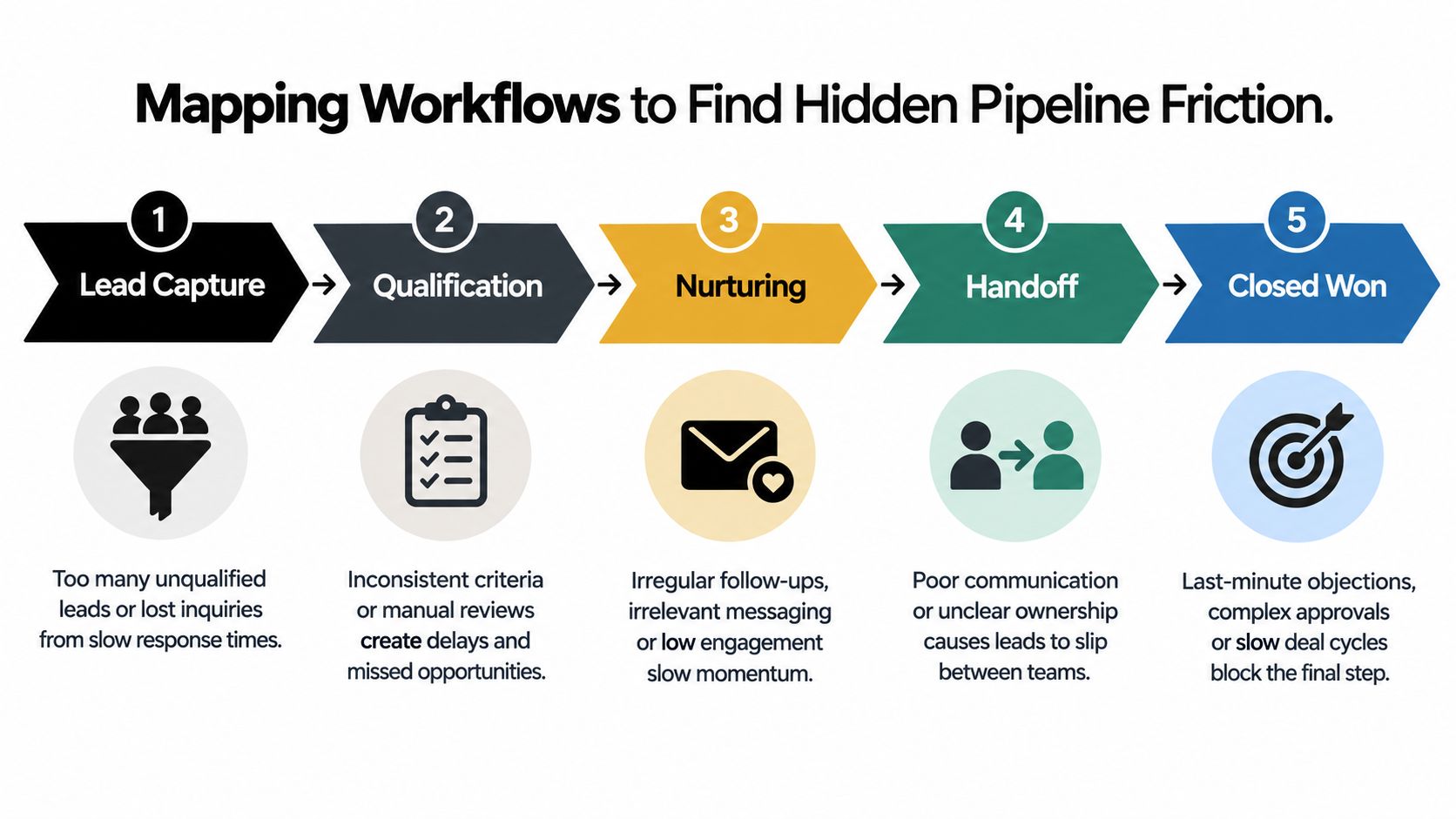
A useful audit separates a workflow into small actions. “Qualify a lead” is too broad to automate responsibly. “Check company fit,” “confirm territory,” “create an opportunity,” and “schedule the first task” are specific enough to assess.
Use four questions for every subtask:
McKinsey's widely cited framework recommends quantifying automation potential by subtask, eliminating non-value-adding activities, standardizing processes with consolidated data, and automating the remaining repetitive work. Its prioritization phase can be completed in a few weeks, according to McKinsey's sales automation framework.
The most damaging friction usually appears between systems or owners. A lead may sit unassigned because a territory field is blank. A rep may postpone CRM updates until the end of the day, leaving managers with an incomplete pipeline. A proposal may be sent without a defined next step, forcing the opportunity to depend on memory.
Rank each bottleneck by frequency, delay, business impact, and automation clarity. A frequent task with clear rules is a strong early candidate. A rare task with high judgment belongs in a guided human workflow, even if software can assist with preparation.
The sales pipeline building framework can help teams connect these observations to opportunity stages. The key is to avoid automating a stage label that different reps interpret differently. First define what evidence moves an opportunity forward, then automate the record update or reminder around that evidence.
A clean workflow isn't the one with the most rules. It's the one where every important event has a clear owner and a reliable next action.
A practical audit should finish with a short decision record. It should state what will be removed, what will be standardized, what will be automated, and what will remain human-led. That record becomes the boundary that prevents scope creep.
Automation follows data. If marketing captures a lead in one system, sales manages an incomplete record in another, and customer success receives a third version after close, every downstream rule becomes fragile. The technical architecture and the handoff design must therefore be treated as one operating problem.
A connected setup starts with a clear system of record for accounts, contacts, and opportunities. Supporting systems can contribute engagement events, meeting details, product signals, or service information, but ownership must remain explicit. Duplicate records, conflicting field values, and unclear update permissions create the kind of uncertainty that makes reps distrust automated assignments.
A handoff should work like a contract between teams. Marketing provides defined information and a reason for the handoff. Sales accepts, rejects, or requests clarification within an agreed workflow. Customer success receives the commercial context and commitments needed to deliver the expected outcome.
A useful handoff record includes:
Recent coverage reports that more than half of sales leaders say disconnected systems hinder AI initiatives, while 74% prioritize data cleansing and integration as the foundation for effective automation (Futurum Group coverage of AI agents and sales automation). The lesson is straightforward: an intelligent action triggered by unreliable data is still an unreliable action.
Round-robin assignment is simple, but simplicity isn't always fairness or effectiveness. Routing may need to account for territory, segment, account ownership, language, product expertise, existing relationships, or capacity. The rule should reflect how the team sells.
A good routing workflow also includes exception handling. If no rep matches the criteria, the record should enter a visible queue with a named owner. If required data is missing, the workflow should request completion rather than automatically assign the lead to the wrong person.
The practical guidance on marketing automation and CRM integration is relevant here because the integration isn't successful when records merely sync. It succeeds when the receiving rep can understand the buyer's context without reconstructing it manually.
Complex negotiations, pricing exceptions, executive introductions, renewal conversations, and recovery after a service problem shouldn't be fully automated. Software can surface account history, prepare reminders, flag risk, and provide approved information. A person should own the interaction.
This is where many programs go wrong. Leaders automate the visible activity, such as sending another message, while leaving the difficult decision unsupported. Action-based orchestration is more useful than volume-based execution because it tells the rep what changed, why it matters, and what judgment is required.
Human-in-the-loop design doesn't reduce automation's value. It makes the automation safer, more credible, and more useful in complex B2B cycles.
A practical playbook should read like a set of operating instructions, not a catalog of features. Each workflow needs a trigger, a condition, an action, an owner, and a stop rule. Without those elements, automation tends to produce either noise or abandoned tasks.
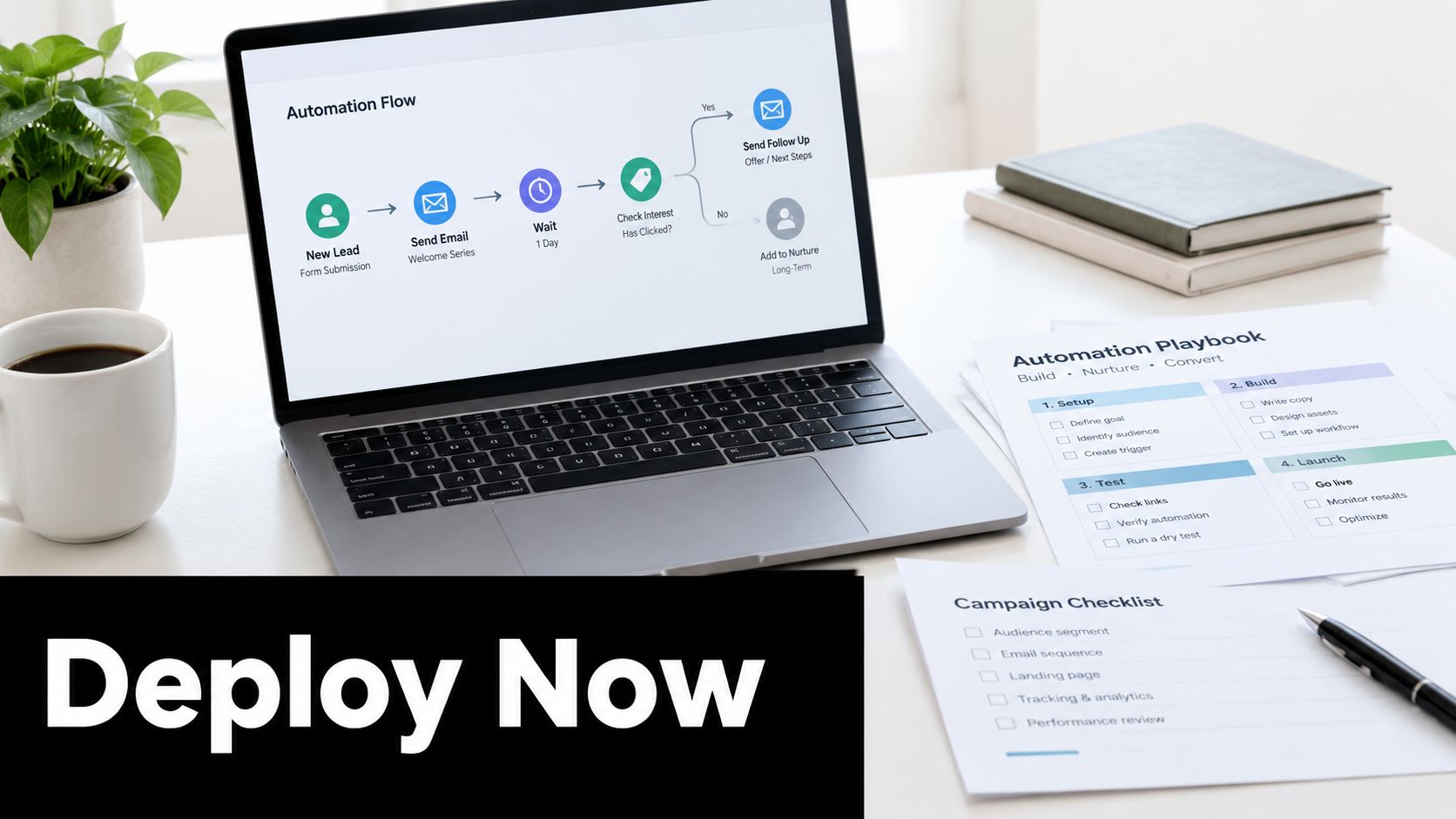
A prospect finishes a product demonstration. The workflow creates a follow-up task, attaches the meeting notes, updates the opportunity stage only when the agreed qualification fields are complete, and offers the rep a short set of relevant resources. If the prospect replies, the sequence stops and the rep owns the next conversation. If the opportunity lacks a next step, the system flags it for review instead of pretending the deal is progressing.
That design preserves judgment. The system handles timing and record hygiene, while the rep chooses the message, interprets objections, and agrees on a next action with the buyer.
A target account visits a high-intent page and returns to related content. Rather than sending an immediate generic email, the workflow checks whether the account already has an owner, whether an open opportunity exists, and whether recent communication is active.
The resulting actions can be modest but useful:
A signal should improve prioritization, not create pressure for its own sake.
Customer success can use a scheduled workflow to identify accounts showing a meaningful decline in product usage, unresolved service issues, or missed engagement milestones. The system creates a review record, gathers the relevant account history, and assigns a human owner. It shouldn't send a threatening renewal message based on one isolated event.
The account team then decides whether the next move is an enablement session, an executive check-in, a service recovery conversation, or no action. The workflow provides visibility and preparation. It doesn't replace account strategy.
A broader B2B marketing automation perspective helps place these examples in the full-funnel context. Sales process automation works best when marketing, sales, and success share event definitions and agree on what each signal should cause.
Static sequences assume every buyer follows the same path. Useful playbooks branch on meaningful behavior:
The rule should be easy for a rep to explain. If the team can't understand why an action fired, adoption will suffer.
A short demonstration can help stakeholders visualize how connected triggers and actions fit together.
<iframe width="100%" style="aspect-ratio: 16 / 9;" src="https://www.youtube.com/embed/EqJoui72QrU" frameborder="0" allow="autoplay; encrypted-media" allowfullscreen></iframe>The best next-day automation is usually not the most advanced. It is the workflow that eliminates a repeated delay, gives someone useful context, and makes the correct next action obvious.
Automation should earn continued investment through evidence. “Emails sent” and “tasks completed” describe activity, but they don't prove that the pipeline became healthier. A useful dashboard connects operational changes to buyer movement and rep output.
Baseline measurement comes first. Before launch, capture the current state of the workflow, including response speed, stage progression, close duration, and data completeness. After launch, compare the same definitions. Otherwise, the team may confuse a change in reporting behavior with a change in sales performance.
Neutral industry guidance emphasizes stage-by-stage conversion, first-contact-to-close duration, and revenue per rep as measures of whether automation improves both speed and output (sales automation KPI guidance).
| Metric | What It Measures | Automation Impact |
|---|---|---|
| Lead response time | The delay between a qualified signal and the first human action | Shows whether routing and alerts reduce avoidable waiting |
| Stage-by-stage conversion | The proportion of opportunities moving between defined stages | Reveals whether consistent follow-up improves progression or merely increases activity |
| Sales cycle length | The time from first contact to close | Indicates whether handoffs and next-step discipline reduce stalls |
| Win rate | The share of qualified opportunities that become closed won | Helps test whether better prioritization improves opportunity quality |
| Pipeline coverage | The relationship between active pipeline and target demand | Shows whether cleaner stage data supports a more credible forecast |
| Revenue per rep | Output generated by each seller | Connects released capacity to commercial performance |
The table should remain small enough to use. A dashboard with every available field often hides the few measures leaders need for decisions.
Faster outreach isn't automatically better outreach. A workflow may reduce response time while increasing irrelevant messages, creating more opt-outs or lower-quality conversations. Pair speed metrics with conversion, deliverability, and qualitative rep feedback.
Review performance at the stage where the automation operates. A routing workflow should first be judged on assignment accuracy and response time. A post-demo workflow should be assessed through follow-up completion, next-step creation, and opportunity progression. Revenue may be the ultimate outcome, but it won't always isolate one workflow quickly.
For reporting teams, marketing reporting dashboards can provide a useful model for connecting activity, funnel stages, and business outcomes without treating every interaction as equal.
Every workflow needs an owner and a review rhythm. The owner checks whether triggers are firing, exceptions are accumulating, records are complete, and reps are taking the intended action. The team then retires rules that create noise and adjusts those that support real work.
A strong review asks three questions:
Those questions keep measurement grounded in pipeline behavior rather than automation theater.
A company-wide launch feels efficient, but it often hides defects until they affect every rep. A phased rollout gives the team a controlled environment to test routing, messaging, permissions, data quality, and training before the workflow becomes part of the operating rhythm.
Implementation guides recommend piloting with five to ten reps and measuring connect rates, email deliverability, and time-to-first-touch over 30 days before expanding (sales automation rollout guidance). The exact team composition matters as much as the size. Include practical users who understand edge cases, not only enthusiastic early adopters.
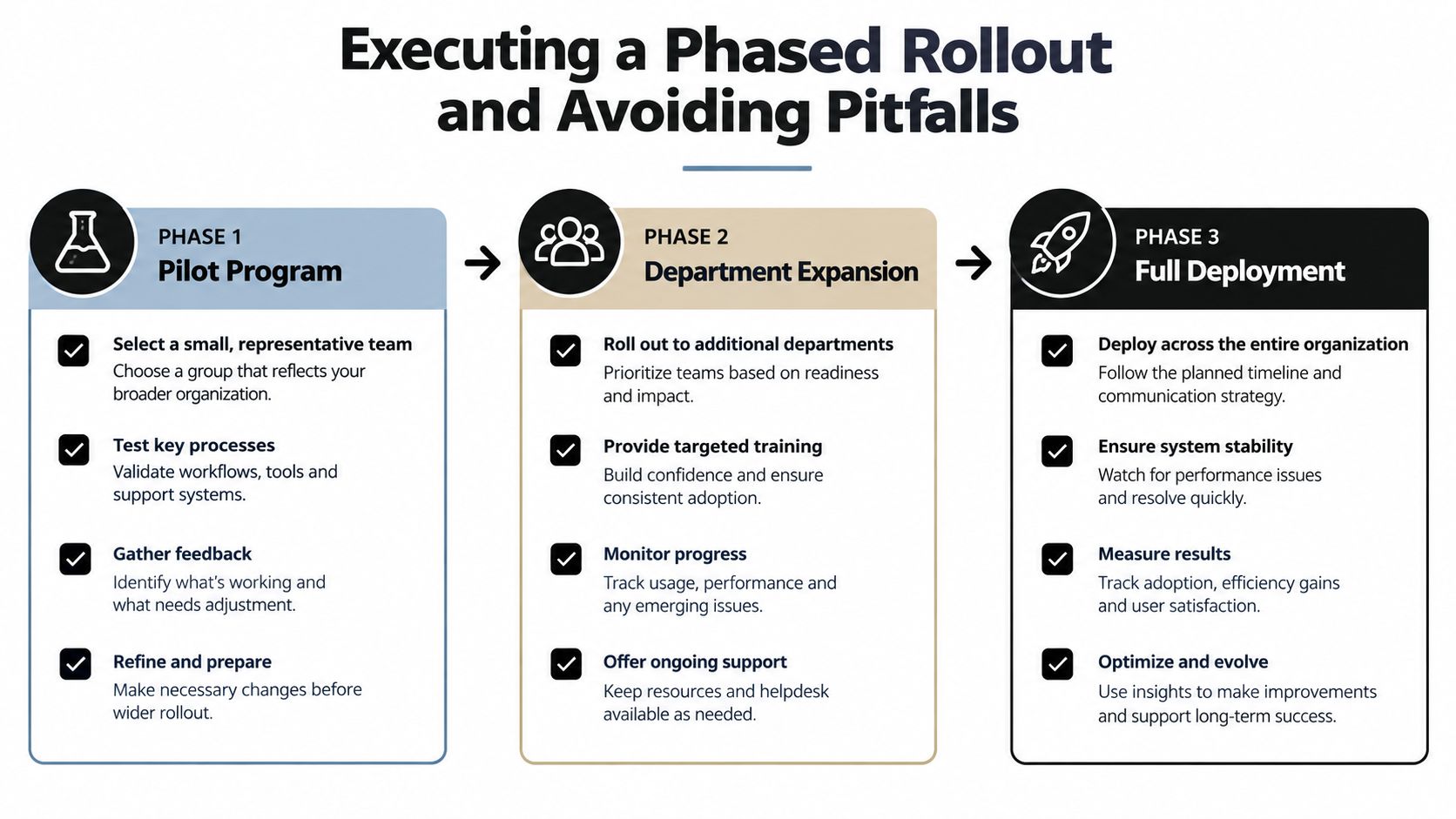
Choose one workflow with a clear owner and a measurable problem. Train the pilot group on the intended process, explain what the automation will and won't do, and create a fast route for reporting errors.
During the pilot, watch for:
Don't expand while the pilot depends on undocumented fixes. Every recurring workaround should either become part of the process or be removed.
Department expansion should preserve the original workflow definition while testing different segments, territories, or sales motions. New users need role-specific examples, not a generic feature tour. Managers should inspect records during pipeline reviews and reinforce the expected behavior.
The most common adoption failure occurs when only part of the team follows the process. Sequence timing, task completion, and reporting then become unreliable, which can erase much of the expected lift. Visible team champions help, but leadership also needs to make the workflow part of normal operating reviews.
Full deployment isn't the finish line. Rules need maintenance as territories change, qualification criteria evolve, and buyers respond differently. Data governance should include ownership for field definitions, duplicate management, permission reviews, and exception monitoring.
The installation mindset causes predictable trouble. Teams launch a tool, hold training, and assume the process will stabilize. A process redesign mindset does the opposite: it reviews evidence, adjusts rules, documents decisions, and keeps human oversight where the risk of a poor automated action is high.
The next practical move is simple. Select one high-friction workflow, document its current path, define its human handoff, and establish the baseline metrics before changing anything. Sprints & Sneakers helps companies connect CRM implementation, marketing automation, reporting, and full-funnel growth experiments into measurable operating systems. Visit Sprints & Sneakers to explore a growth scan and identify the pipeline bottleneck worth automating first.
Growth marketing, AI and automation, SEO, performance marketing, retention strategies, and sustainable business practices.
Weekly. Subscribe to our newsletter to get new articles straight to your inbox.
Absolutely. Everything we publish is designed to be actionable. Take it, test it, and make it your own.
Yes. We publish experiments with real numbers. What worked, what didn't, and what we learned.
Our growth team — strategists, performance marketers, data specialists, and AI builders who work on client campaigns every day.
We're open to it. Reach out via our contact page with your topic and we'll take a look.