
Learn how to calculate conversion rate with simple formulas, real worked examples, benchmarks, and segmentation tips you can apply to your funnel tomorrow.
Most advice about how to calculate conversion rate starts and ends with a division problem. That's the easy part. The harder problem is deciding what belongs in the denominator, because visits, unique visitors, clicks, and funnel entrants answer different business questions.
A campaign can look healthy in one report and weak in another without either calculation being mathematically wrong. This guide covers the formula, denominator choices, spreadsheet-ready examples, relevant benchmarks, and segmentation tactics that make the result defensible. By the end, a conversion rate report should be reproducible, interpretable, and tied to a clear next action.
A marketing team launches a campaign, collects form submissions, and opens the reporting dashboard. One view shows a respectable rate. Another shows something lower. The debate quickly shifts from performance to measurement, with nobody able to reproduce the number from the original report.
That failure usually doesn't come from bad arithmetic. The denominator changed. One report may divide conversions by total visits, while another divides them by unique visitors. A third may count only people who reached a pricing page or started checkout. All three can be valid, but they measure different stages of audience behavior.
The standard formula is (conversions ÷ visitors) × 100, but the metric changes depending on whether the denominator is total visits, unique visitors, clicks, or another audience measure. Adobe explicitly distinguishes between “conversion rate (Visits)” and “conversion rate (Visitors)”, a distinction explained in this practical guide to calculating conversion rate.
A form submission, purchase, signup, download, or booked meeting can all be conversions. The business must choose the event first, define the measurement window, and then select the audience that had the opportunity to complete it.
That definition belongs beside the metric in every dashboard. “Conversion rate” on its own is incomplete. A defensible label looks more like “completed forms divided by unique landing-page visitors during the reporting period.”
A reliable marketing tracking and analytics framework helps teams document those choices before performance reviews begin. Once the numerator and denominator stay consistent, the argument becomes useful: teams can discuss the quality of traffic, the strength of the offer, and the bottleneck in the journey instead of arguing over spreadsheet formulas.
Practical rule: Never publish a conversion rate without naming the conversion event, denominator, segment, and measurement window.
The core calculation is deliberately simple:
Conversion rate = (conversions ÷ total visitors or visits) × 100
Suppose a page receives 500 visitors and produces 50 conversions. The calculation is 50 ÷ 500 = 0.10, and 0.10 × 100 = 10%. This example follows the basic formula described in Adobe's conversion rate explanation.
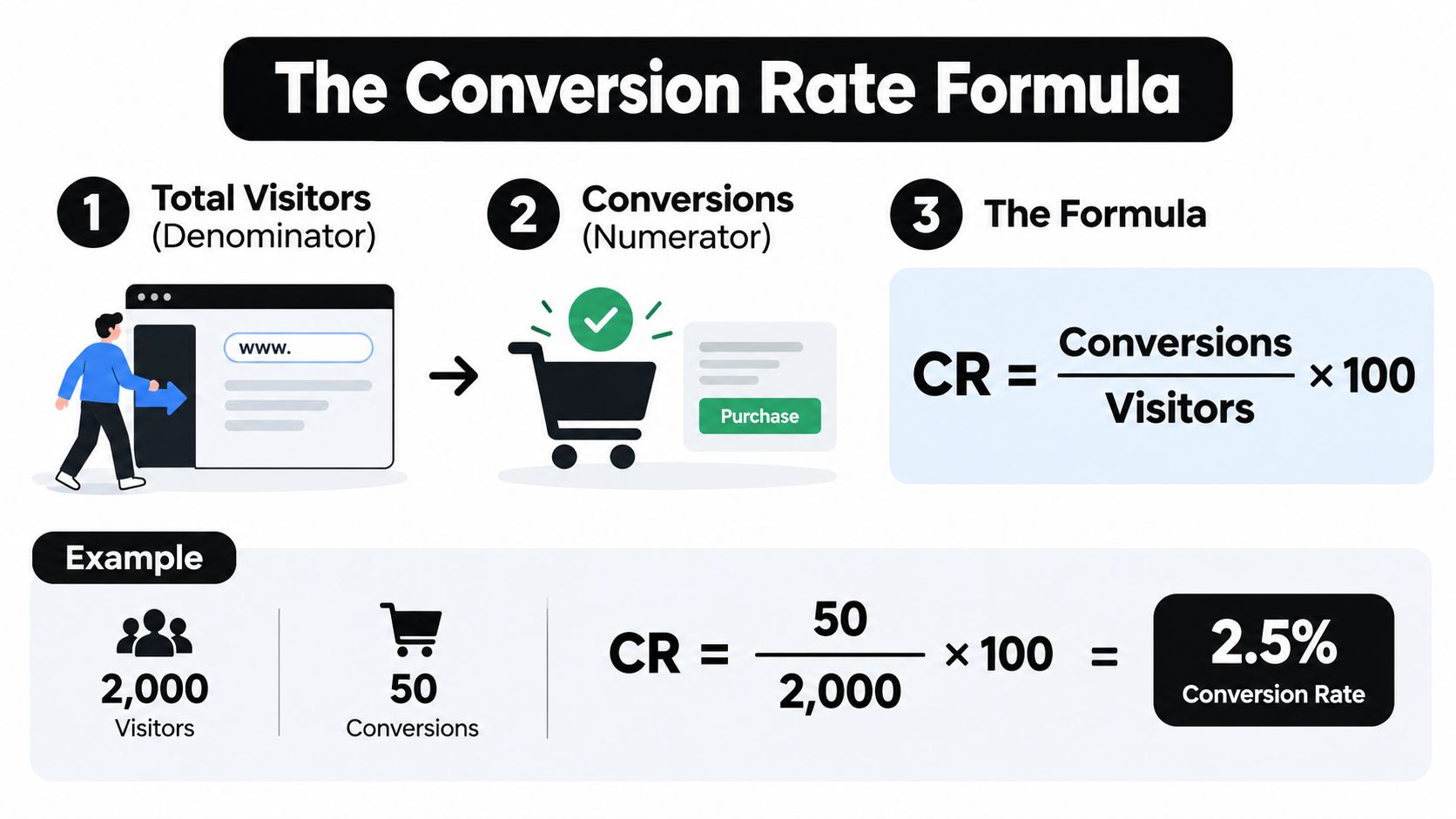
The arithmetic has three steps:
The numerator needs just as much discipline as the denominator. A purchase is not the same event as an add-to-cart action. A completed lead form is not the same as a form start. A newsletter signup is not the same as a qualified sales opportunity.
For an ecommerce report, the conversion may be a completed order. For a B2B landing page, it may be a submitted form. For a software company, it may be an account creation or a completed demo request. The right event is the one connected to the business question, not the event that produces the largest percentage.
Micro-conversions can still matter. Page engagement, product views, form starts, and cart additions can reveal where people drop out, but they shouldn't be blended into the headline conversion rate. Keeping them as separate events preserves the meaning of the main result.
The formula is universal, but the question determines the inputs. “How many visits ended in an order?” calls for a visit-based calculation. “What share of people who saw the offer eventually submitted a form?” calls for a visitor-based or funnel-stage calculation.
The calculation itself takes seconds. The documentation around it determines whether anyone can trust the answer.
<iframe width="100%" style="aspect-ratio: 16 / 9;" src="https://www.youtube.com/embed/2IJ2cUEcGEo" frameborder="0" allow="autoplay; encrypted-media" allowfullscreen></iframe>The denominator should match the behavior being measured. A visit-based rate works when every visit creates a fresh opportunity to convert, such as an ecommerce session. A visitor-based rate is often more useful when the desired action typically happens once, such as creating an account. A funnel-stage rate focuses on people who reached a defined step.
Adobe's comparison shows how the result changes across experiences. 255 purchases from 2,525 visitors equals 10.09%, while 382 purchases from 2,540 visitors equals 15.04%, as documented in this conversion rate example using visitor counts.
| Formula | Best For | Watch Out For |
|---|---|---|
| Total conversions ÷ total visits × 100 | Ecommerce journeys where each visit can produce an order | Repeat visits can make the rate look lower than the person-level outcome |
| Unique visitors who converted ÷ total unique visitors × 100 | Account creation, lead generation, or actions people usually complete once | Identity resolution and repeat users can affect the count |
| Visitors completing the funnel ÷ visitors entering the funnel × 100 | Checkout, signup, onboarding, or another defined journey | The starting point must be documented and applied consistently |
The most common reporting error is mixing sessions, unique visitors, and pageviews in one trend line. That makes a change in measurement look like a change in performance.
A pageview is not necessarily a visit. A visit is not necessarily a unique person. A person can create multiple visits, and a single visit can generate multiple pageviews. Those distinctions matter even when the conversion count stays unchanged.
A useful conversion funnel analysis approach starts by defining the population at each stage. If the report evaluates checkout completion, the denominator should be people or visits that entered checkout, not every visitor who landed on the site.
The practical rule is straightforward: choose the denominator that matches the question, label it in the report, and use the same rule in every comparison period. If both visit-based and visitor-based rates are useful, report both as separate metrics rather than blending them into one ambiguous average.
A spreadsheet only needs a few clearly named columns: conversion event, conversions, denominator, denominator type, calculation, and result. The examples below show the arithmetic in a format that can be copied into a reporting template.
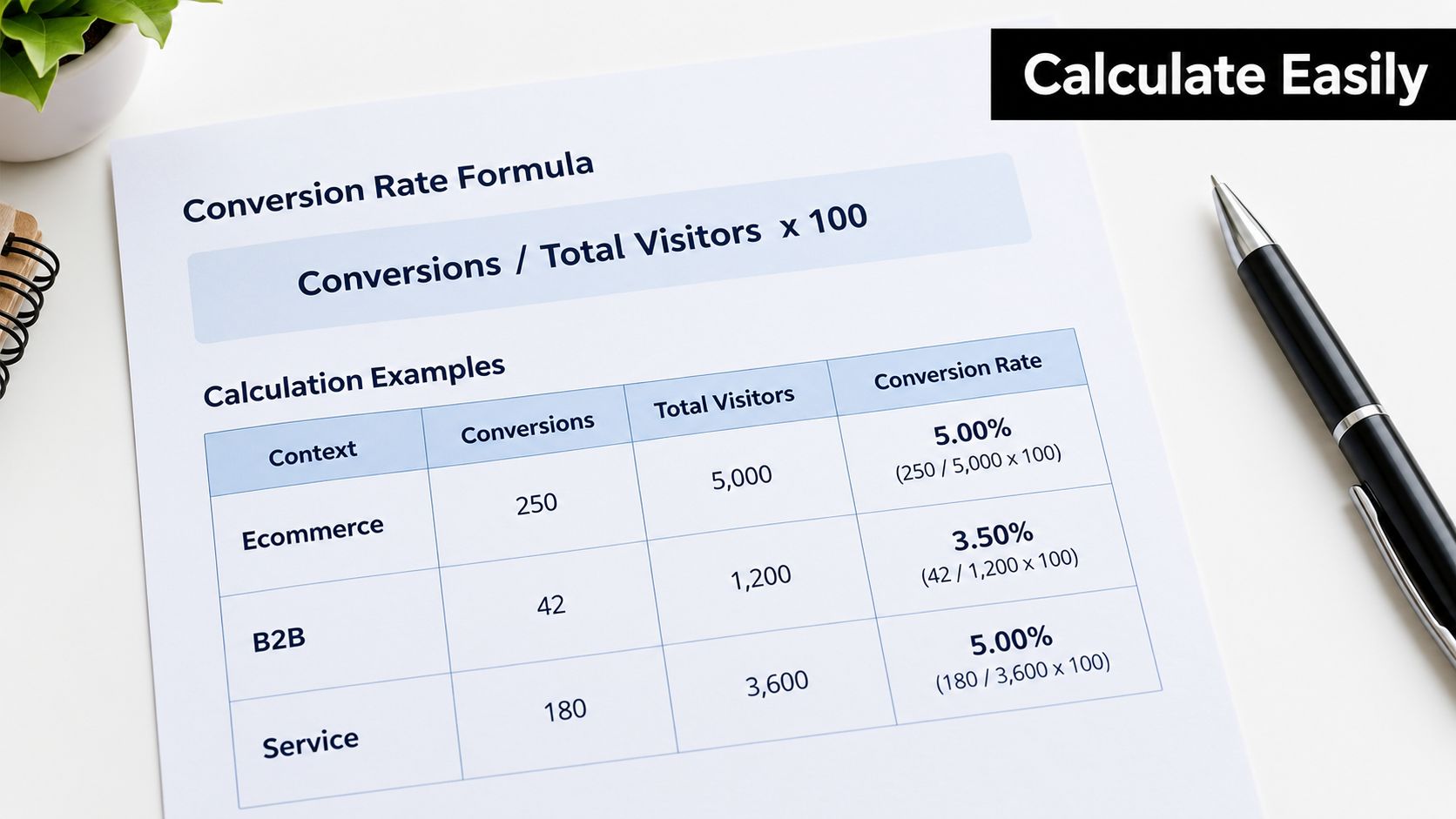
A store records 50 orders from 2,000 sessions. The calculation is:
50 ÷ 2,000 = 0.025
0.025 × 100 = 2.5%
That example is consistent with the ecommerce calculation described by Hostinger's conversion rate examples. The denominator is sessions, so the result answers this question: what share of recorded sessions ended in an order?
A different report can use visits and still follow the same mechanic. 50 orders from 1,000 visits equals 5%, an example also included in the referenced guidance. The two results shouldn't be compared without checking whether the traffic-counting rule is identical.
A landing page receives 150 form submissions from 5,000 visitors. The calculation is:
150 ÷ 5,000 = 0.03
0.03 × 100 = 3.0%
This is a visitor-based rate. It describes the share of visitors who submitted the form during the defined window. If the business instead wants to measure completed forms among people who reached the form step, the denominator must change to funnel entrants.
A site records 181 purchases from 12,355 visitors. The calculation is:
181 ÷ 12,355 = 0.01464994
0.01464994 × 100 = 1.464994%
Rounded result: 1.46%
This example appears in Indeed's worked conversion rate calculation. The full decimal makes the result auditable, while the rounded percentage keeps the dashboard readable.
A simple template can calculate the result automatically once the event and denominator type are fixed. The reporting owner should still inspect the source counts each time, because a clean formula can't correct a duplicated conversion event or a denominator drawn from the wrong audience.
For teams reviewing acquisition economics, the rate also becomes more useful alongside customer acquisition cost calculation. A conversion percentage describes behavior. Cost data helps determine whether that behavior supports a sustainable growth decision.
A calculated rate has no meaning in isolation. The relevant comparison depends on page type, channel, audience, conversion event, and region. A landing-page rate shouldn't be judged against an ecommerce sitewide rate, and a paid search result shouldn't be evaluated as though it came from organic search.
A large benchmark dataset provides useful context. Unbounce's 2024 report analyzed 464 million visits, 41,000 pages, and 57 million conversions, finding a 6.6% median landing-page conversion rate across industries. The reported range ran from 3.8% in SaaS to 12.3% in entertainment, according to this conversion benchmark summary.
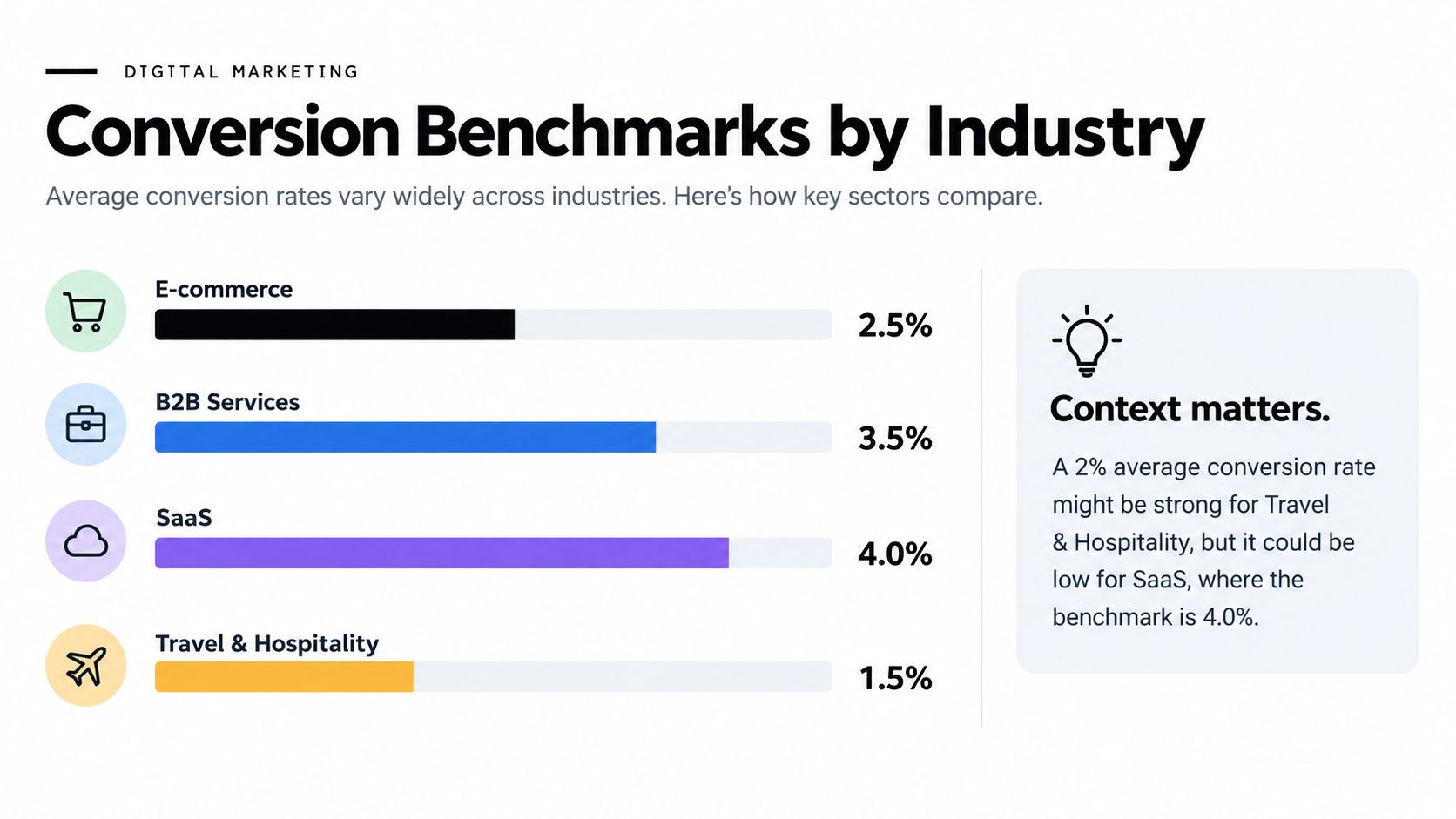
The same source cites 2026 data showing a 2.35% median website conversion rate, with top performers reaching 11.45%. It also lists channel averages of 4.9% for organic search and 5.4% for paid search. These figures are useful as directional context, but they don't replace a like-for-like comparison.
A rate should be judged against the benchmark closest to its actual setting:
A rate that seems weak against a broad website average may be healthy for a difficult audience or an early funnel action. A rate that looks strong may still hide poor-quality leads, low order value, or excessive acquisition costs.
For ecommerce teams that need a more focused comparison, PlatformDTC's benchmark data can add category-specific context. The decision rule is simple: use benchmarks to ask better questions, then prioritize against the site's own historical performance and business outcomes.
An aggregate rate hides the operational problem. A single sitewide percentage can combine high-intent returning visitors with first-time traffic, mobile users with desktop users, and several acquisition sources with very different expectations.
The fix is to track the exact conversion event as a goal or key event, then segment the result without changing the underlying definition. Guidance on measuring and segmenting conversion rate recommends breaking performance down by source, device, geography, and new versus returning users.
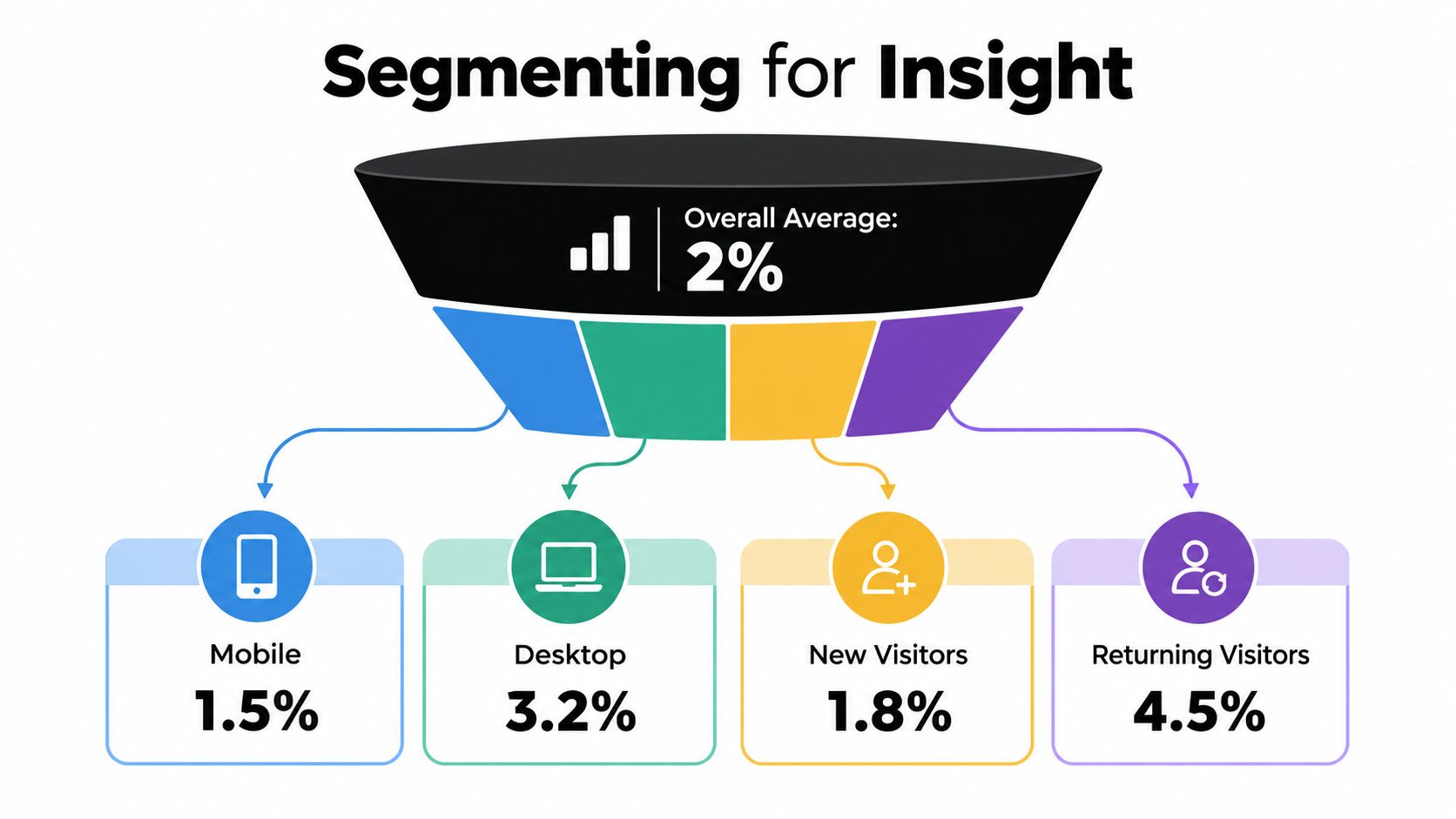
A practical reporting view should answer four questions:
The rate should also be visible at each funnel stage. For a lead journey, that might mean landing-page visit to form start, form start to submission, and submission to qualified opportunity. For ecommerce, it may include product view, cart addition, checkout start, and completed order.
The lowest percentage isn't automatically the first problem to fix. A late-stage step may have a poor-looking rate but affect a small audience, while an earlier step may lose far more potential customers. Stage-by-stage reporting makes that difference visible.
A market segmentation strategy becomes useful when each segment uses the same event and denominator rules. Otherwise, the team may mistake a tracking inconsistency for a customer difference.
Keep the measurement method stable across periods. If the reporting team changes from sessions to unique visitors halfway through a campaign, the trend no longer shows performance movement cleanly. It shows a new definition.
A trustworthy, segmented rate gives the team a priority list. It doesn't automatically improve performance, but it stops the team from testing random page changes against an unreliable baseline.
The next-day workflow should be practical:
A conversion rate shouldn't be optimized because it looks aesthetically pleasing on a dashboard. It should be improved because a specific audience is failing at a specific step for a plausible reason. The conversion rate optimization process becomes more effective when measurement and experimentation use the same definitions.
The formula takes seconds. The discipline behind it is what creates durable insight. Define the event, choose the denominator, segment the audience, and compare against the right context before changing the page.
Sprints & Sneakers helps B2B and B2C teams identify funnel bottlenecks, prioritize experiments, and connect conversion improvements to measurable growth outcomes. Visit Sprints & Sneakers to explore a practical growth scan and discuss the next conversion opportunity.
Growth marketing, AI and automation, SEO, performance marketing, retention strategies, and sustainable business practices.
Weekly. Subscribe to our newsletter to get new articles straight to your inbox.
Absolutely. Everything we publish is designed to be actionable. Take it, test it, and make it your own.
Yes. We publish experiments with real numbers. What worked, what didn't, and what we learned.
Our growth team — strategists, performance marketers, data specialists, and AI builders who work on client campaigns every day.
We're open to it. Reach out via our contact page with your topic and we'll take a look.