
Sales Pipeline Dashboard Guide to Metrics That Matter
Build a sales pipeline dashboard that drives decisions. Learn the metrics to track, design best practices, and visualizations that support full-funnel growth.
A prettier sales pipeline dashboard doesn't make a forecast more accurate. It can make a weak forecast look polished, which is worse: leaders may trust numbers built on inconsistent stages, optimistic close dates, or stale CRM records. The dashboard worth building isn't the one with the most charts. It's the one that makes assumptions visible and tells the team what to do next.
That distinction matters for B2B scale-ups, where marketing, sales, and leadership need a shared view of revenue without mistaking tidy reporting for trustworthy evidence. The right dashboard measures pipeline movement and shows how much confidence each number deserves.
Table of Contents
- Why Most Sales Pipeline Dashboards Miss the Point
- What a Sales Pipeline Dashboard Actually Is
- The Core Metrics Every Dashboard Needs
- Why Data Confidence Beats Dashboard Aesthetics
- Connecting the Dashboard to the Full Funnel
- Designing Dashboards People Actually Use
- A Next-Day Walkthrough With Real Numbers
- What to Build First and What to Skip
Why Most Sales Pipeline Dashboards Miss the Point
A clean-looking dashboard can still tell a false story. If one rep treats a first meeting as qualification and another treats it as discovery, stage conversion rates won't mean much. If close dates move without explanation, expected revenue becomes a record of optimism rather than a useful forecast.
The problem isn't new. A field study published in 2000 examined forecasting across 13 manufacturing firms and found corporate forecasts weren't consistently more precise than a straightforward, unseasoned naïve forecast, even though accuracy was the primary factor organizations considered when choosing a method (the field study on sales forecasting practices). Better reporting, by itself, didn't guarantee better predictions.
Visibility needs operating discipline
For a B2B team, the practical lesson is blunt: a dashboard can't rescue inconsistent inputs. Teams need shared stage definitions, comparable probabilities, close dates that reflect buyer evidence, and regular reviews of predicted outcomes against actual wins and losses. Without those habits, the dashboard organizes unreliable assumptions.
That doesn't make dashboards pointless. It makes them more than a display. A useful sales pipeline dashboard shows commercial status and helps the team spot where its assumptions keep failing. When forecast categories repeatedly miss, leaders should inspect the underlying definitions and behaviors, not ask for another chart.
Practical rule: If a dashboard can't show why a deal is forecasted to close, it shouldn't present that forecast as a fact.
Sales managers exploring how AI can support operational visibility may find these sales manager AI dashboard tips useful as a complement to sound data practices. The priority remains the same: establish what the records mean before automating decisions from them.
What a Sales Pipeline Dashboard Actually Is
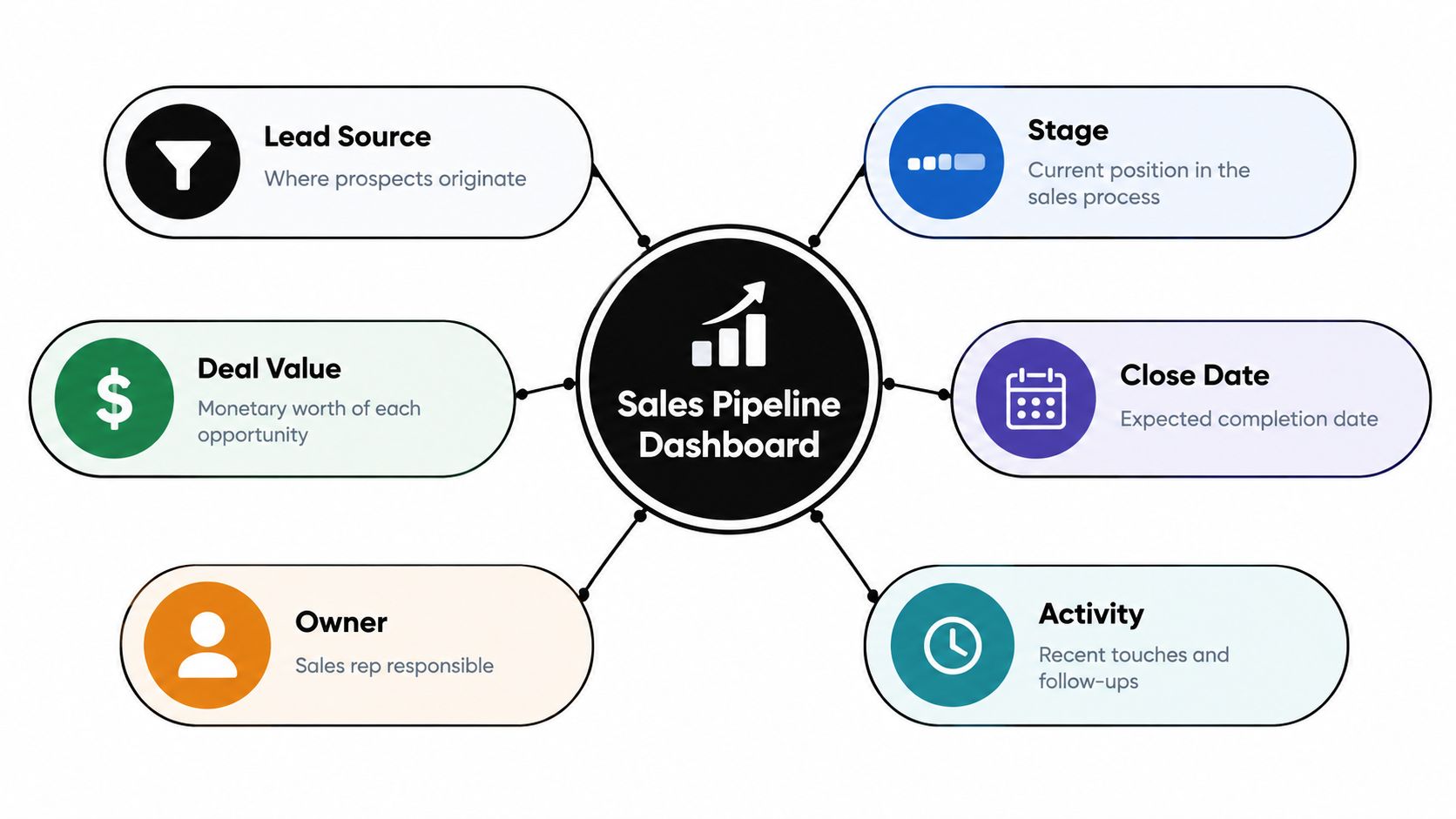
A sales pipeline dashboard turns CRM records into a shared operating view. It brings together lead source, stage, deal value, expected close date, owner, and activity history so a team can inspect pipeline coverage, stage progression, forecast categories, and expected revenue without stitching together disconnected reports.
Think of it as the cockpit instruments of a revenue operation, not its destination map. The go-to-market strategy sets the destination. The dashboard shows whether opportunities are advancing, stalling, or carrying enough evidence to support the forecast.
The CRM inputs behind the view
The dashboard depends on records that answer basic questions. Where did the prospect come from? What stage is the opportunity in? What is the potential value, who owns it, and when does the team expect a decision? What has happened recently, and what action comes next?
That's a practical starting point because CRM software is already widely used: 91% of companies with more than 11 employees use CRM software, while 50% of CRM use cases are devoted to sales-force automation, according to CRM adoption and usage reporting. Adoption alone doesn't ensure good reporting, but it means CRM records can provide a common foundation across sales, marketing, finance, and leadership.
A pipeline dashboard isn't a marketing dashboard, a finance dashboard, or a collage of activity counts. It should help people make commercial decisions: whether coverage is adequate, which stages leak opportunities, where a forecast looks exposed, and which deals need attention. If a metric doesn't inform one of those decisions, it probably doesn't belong in the main view.
The Core Metrics Every Dashboard Needs
A serious dashboard pairs each metric with a decision. Total pipeline value, on its own, is not a useful verdict. It can rise while deal quality falls, and it won't tell a manager where to intervene.
| Metric | What It Measures | Decision It Drives |
|---|---|---|
| Pipeline coverage | Pipeline value relative to the team's target | Whether the team needs more qualified opportunities or should focus on closing |
| Stage conversion | The share of opportunities advancing between stages | Where qualification, messaging, or deal execution needs attention |
| Win rate | The share of opportunities that become wins | Whether changes in deal quality or sales execution merit investigation |
| Sales-cycle length | Time opportunities take to move through the pipeline | Whether deals are progressing at a pace consistent with the forecast |
| Pipeline velocity | Expected revenue generated per selling day | Whether growth needs more opportunities, stronger conversion, larger deals, or faster movement |
Use velocity to diagnose, not decorate
Pipeline velocity combines opportunity volume, win rate, average deal size, and average sales-cycle length. Its formula is (open opportunities × win rate × average deal size) ÷ average sales-cycle length in days. For example, 40 open opportunities, a 25% win rate, a $20,000 average deal, and a 50-day cycle produce $4,000 of expected revenue per selling day (pipeline velocity formula and example).
That result is more useful when broken out by segment. If velocity falls, the dashboard should make it possible to see whether the cause is fewer opportunities, weaker conversion, smaller deals, or slower progress. Each points to a different response. "Create more pipeline" isn't a strategy if conversion is the problem.
Stage conversion and win rate also deserve context. A falling rate doesn't prove that a team is selling poorly. It may reveal a change in qualification, a shift in the opportunity mix, or inconsistent stage criteria. Leaders should investigate the cause before prescribing a fix.
For a focused look at how to interpret pipeline shape and movement, sales pipeline analysis can help teams frame the questions behind the dashboard. Founders who want a repeatable approach to operating pipeline can also explore pipeline management playbooks for founders.
Why Data Confidence Beats Dashboard Aesthetics
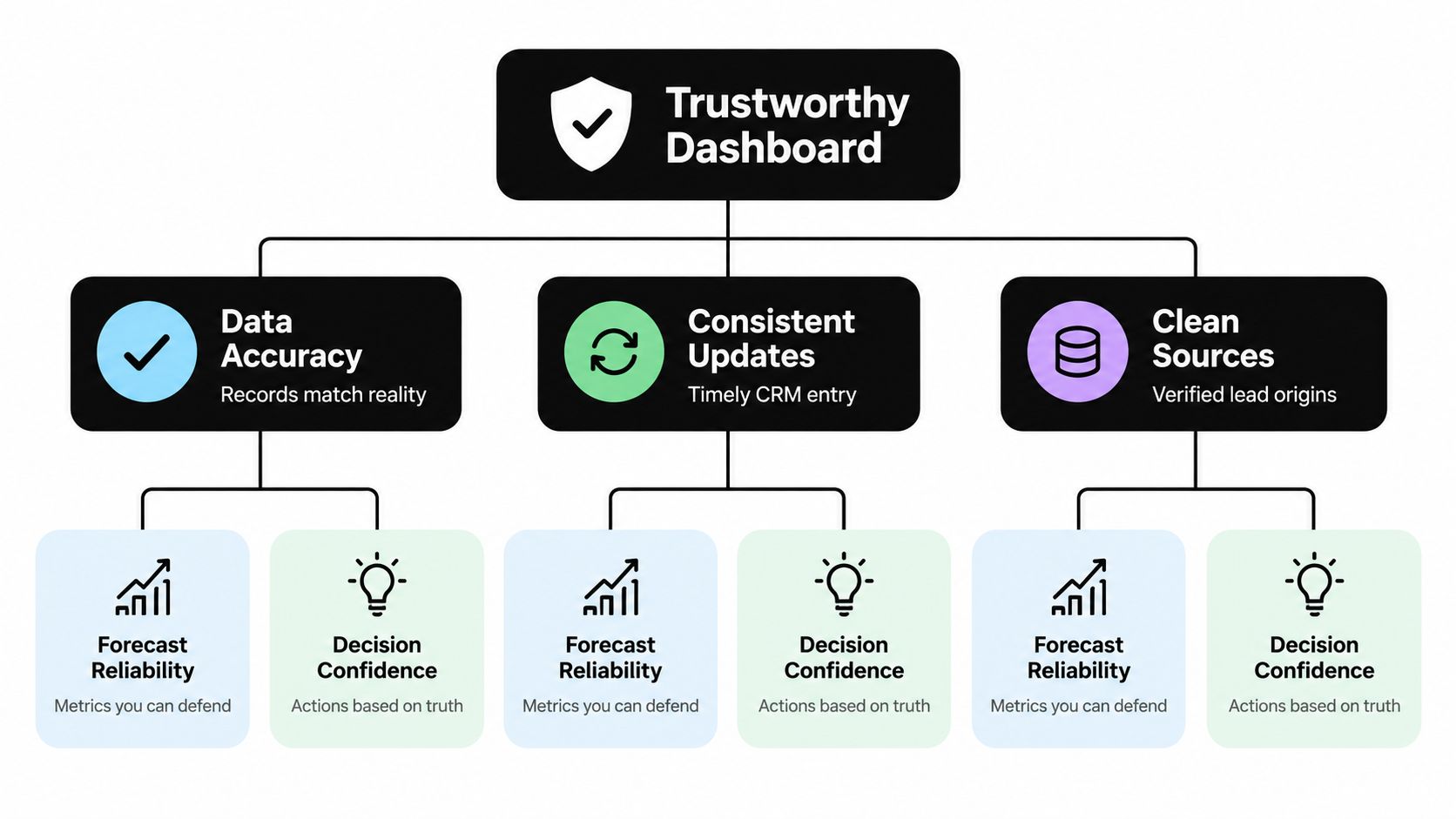
A forecast metric without a data-confidence indicator invites false certainty. A large opportunity total can look reassuring while the records underneath it are incomplete, stale, or unsupported by recent buyer activity. Leaders need to see both the number and the quality of evidence behind it.
A 2025 G2 survey of more than 1,000 B2B software buyers reported that 60% were using AI in sales processes and emphasized that accurate, complete CRM data and interaction capture across marketing, sales, calls, and email are prerequisites for trustworthy forecasting (G2's 2025 report on AI in sales). Add more automation to unreliable records and the team may scale bad assumptions.
Put confidence beside the forecast
A practical data-confidence panel can show record completeness, stale-opportunity rates, missing next steps, inconsistent close dates, duplicate accounts, and the share of pipeline backed by recent buyer activity. These aren't decorative quality checks. They help a manager decide whether to rely on a forecast number, inspect an opportunity, or mark it as a risk.
Stage rules should specify what evidence needs to exist before an opportunity advances. A stage shouldn't be earned by a rep changing a dropdown. It should reflect buyer progress, such as confirmed needs, stakeholder participation, or a documented next step. Teams can define the evidence that fits their own sales process, then review exceptions in the regular pipeline meeting.
A complete CRM record is not the same as a healthy deal.
That distinction prevents teams from optimizing data entry for its own sake. A record can have every field filled in and still lack buyer engagement or a credible path to purchase. Connecting CRM records with marketing activity can support a fuller operating picture; teams assessing that connection can review marketing automation and CRM integration.
Connecting the Dashboard to the Full Funnel
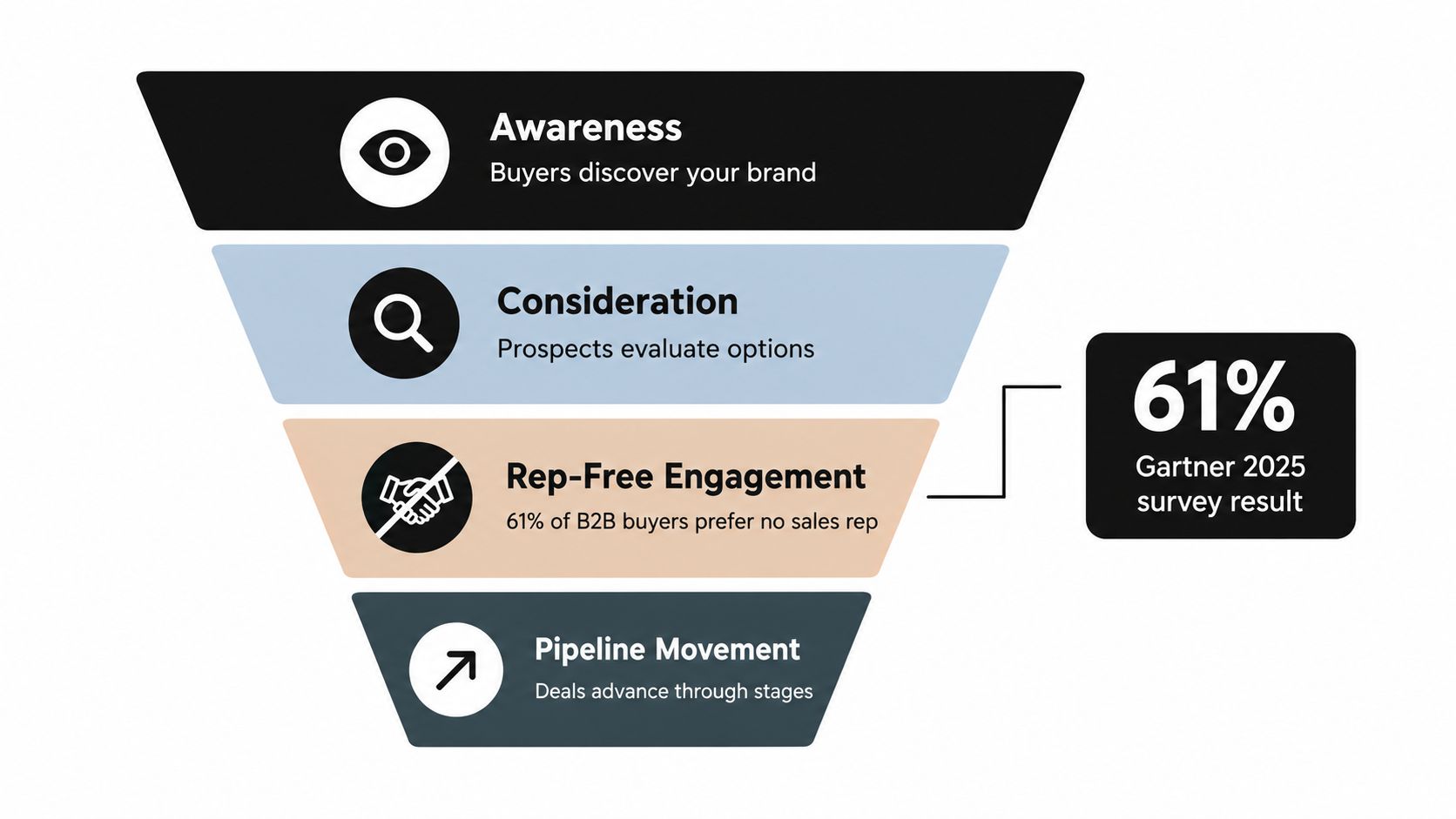
A buyer's journey doesn't always move neatly from seller-led discovery to a scheduled demo and then through fixed pipeline stages. Some buyers research independently, return to product or pricing information, involve colleagues, and contact sales only when they need help evaluating fit.
Gartner's 2025 survey found that 61% of B2B buyers preferred a rep-free buying experience, while also finding that buyers preferred seller input for contextual tasks such as determining whether a solution fit their company's needs (Gartner's survey on rep-free buying preferences). Low seller activity, then, shouldn't automatically be read as low intent.
Make buying-group coverage visible
A full-funnel dashboard should connect sales-stage reporting with the buying signals teams can observe: self-service research, pricing or product-page engagement, content consumption, product use or trial activity, stakeholder involvement, and direct conversations. It should also be honest about what it can't connect. If an interaction is anonymous, label it as unresolved instead of claiming attribution the data can't support.
For a known opportunity, the dashboard can show how many roles are engaged, which important stakeholders remain unconfirmed, whether interest has returned, and whether the buyer group has taken concrete steps. Relationship depth can add useful context: a benchmark analysis covering 3.2 million opportunities from 364 companies found an average 42% win rate for enterprise deals involving 10 to 12 relationships, while sales cycles were shortest when accounts had 7 to 9 relationships. That's a reason to inspect stakeholder coverage, not a target to impose blindly on every deal.
The dashboard should distinguish rep-free preference from rep-free suitability. Buyers may want to research without a salesperson, then ask for help with fit, context, or internal justification. A useful view helps marketing and sales see those shifts without pretending every anonymous visit belongs to a specific contact.
Teams mapping pipeline activity to broader funnel performance can use marketing analytics dashboard guidance to think through how demand signals and revenue outcomes fit together.
Designing Dashboards People Actually Use
A dashboard gets used when it answers a question the people in the room are already trying to resolve. Start with the audience and decision, not the chart type. A sales leader needs a defensible forecast view; a manager needs a short list of deals requiring action.

Lay out the meeting, not the data warehouse
A practical layout keeps the main questions visible without forcing people to hunt:
- Top row: Pipeline coverage, forecast versus target, and a confidence indicator that shows whether the underlying records are dependable.
- Middle: Stage conversion and a velocity trend, with filters for segments the team manages.
- Bottom: Exceptions, including owner, stage age, missing next step, and the reason a deal has been flagged.
Match visual forms to the question. Bar charts help compare stages or segments. Funnel charts show where opportunities stop progressing. Line charts show how velocity changes over time. A compact exception list puts the next action beside the opportunity.
Pie charts usually waste space here. They make it harder to compare values and rarely tell the team what to do. Color should also stay restrained: if every chart is red, amber, or green, those signals stop meaning anything.
A manager should be able to scan the dashboard quickly and leave with a clear list of follow-ups. Leadership should be able to inspect the same forecast and understand its assumptions. Teams building reporting for revenue and marketing decisions can also review marketing reporting dashboards.
A short walkthrough can make the difference between a dashboard people admire and one they use in their operating rhythm:
<iframe width="100%" style="aspect-ratio: 16 / 9;" src="https://www.youtube.com/embed/SXArjc3Hw50" frameborder="0" allow="autoplay; encrypted-media" allowfullscreen></iframe>A Next-Day Walkthrough With Real Numbers
On Monday morning, a SaaS team sees that pipeline velocity is down 18% month over month. Enterprise conversion has moved from 32% to 24%, while average deal size is steady. Those example figures point the meeting toward conversion, not deal value.
One late-stage opportunity worth $180,000 has just one active contact. A relationship-depth alert prompts the owner to map the buying group and identify who else needs to be involved. The benchmark linked above provides context for why stakeholder coverage matters, but the team's next action should fit the actual account.
A second opportunity has sat in proposal-to-negotiation for 31 days without a documented next step. The manager marks it as forecast risk until the owner confirms a credible path forward. Meanwhile, the rep-free signal panel shows increased pricing-page visits from a target account with no identified stakeholder, so marketing and sales coordinate a relevant follow-up without pretending they know who visited.
The meeting ends with three actions: re-engage the enterprise buying group, pursue the target account through an appropriate discovery route, and stop counting the stale opportunity at full confidence. That's what an operational dashboard does. It turns signals into named owners and next steps.
What to Build First and What to Skip
Build the working core first: pipeline coverage, win rate by stage, sales velocity, and a data-confidence panel for record completeness and stale opportunities. Add buying-group coverage and rep-free behavior once the team can maintain the underlying signals.
Skip AI-generated deal scores that sit on untrustworthy data, attribution views that duplicate existing marketing reporting, and any chart that doesn't change a decision. The analytics dashboard examples can help teams think through useful reporting patterns without treating every possible metric as necessary.
Review the dashboard regularly, compare predictions with outcomes, and retire metrics that don't lead to action. Sprints & Sneakers helps B2B and B2C teams connect marketing, CRM data, and full-funnel experiments to more predictable growth.
If the dashboard shows pipeline but can't show why leaders should trust it, start with the data and the decisions it needs to support. Visit Sprints & Sneakers to explore a growth scan and identify the bottleneck limiting your pipeline.
Related articles

Sales intelligence for B2B: how to turn market signals into pipeline
Sales reps spend only about a third of their time actually selling. The rest is spent on administrative tasks and searching for information. Signal intelligence solves this problem. This is a practical guide to your B2B stack by team size.
Frequently asked questions
Growth marketing, AI and automation, SEO, performance marketing, retention strategies, and sustainable business practices.
Weekly. Subscribe to our newsletter to get new articles straight to your inbox.
Absolutely. Everything we publish is designed to be actionable. Take it, test it, and make it your own.
Yes. We publish experiments with real numbers. What worked, what didn't, and what we learned.
Our growth team — strategists, performance marketers, data specialists, and AI builders who work on client campaigns every day.
We're open to it. Reach out via our contact page with your topic and we'll take a look.