
How to Build Sales Pipeline Automation in 2026
Build sales pipeline automation that speeds up responses and lifts conversion. Map stages, wire your CRM, and test each workflow with clear metrics.
A campaign goes live on Tuesday. By Thursday the CRM holds 400 new leads, six of them owned by a rep who left in March, and the forecast hasn't moved since the quarter opened. Marketing asks why sales isn't following up. Sales says the leads are junk. Both are describing the same failure: the pipeline is being run by habits, a spreadsheet export and one person who remembers things.
That's the week most companies start shopping for automation. Usually they buy too much of it too fast, wire a dozen workflows onto stages nobody agreed on, and end up with a faster version of the same mess. Sales pipeline automation is the set of rules, integrations and AI-assisted steps that move a deal from first touch to close without anyone retyping the same information. Built in the right order, it returns selling hours and makes the pipeline readable. Built in the wrong order, it manufactures activity and calls it progress.
The order matters more than the tool. Stages first, buyer moments second, measurement third, and only then the workflows everyone wants to build on day one.
Table of Contents
- Map Every Stage Before You Automate Anything
- Choosing Tools and Connecting Your CRM
- How to Build Your Automation in Seven Steps
- Four Recipes You Can Ship Tomorrow
- Measuring Conversion and Velocity Without Activity Traps
- Aligning Sales, Marketing and Buyers Who Research First
- Confirm Your Stage Map This Week
Map Every Stage Before You Automate Anything
Automation copies whatever process you feed it, including the parts nobody agreed on. Feed it six stages with vague names and it will reproduce six stages of confident mislabelling at scale, faster than any rep could manage by hand. So the map comes before the first workflow, not after.
Most B2B scale-ups run six stages worth mapping: new lead, qualified, discovery, proposal, negotiation, closed won. The names aren't the work. The entry rule, the trigger that fires when the rule is met, the owner and the metric are.
| Stage | Entry rule | Automation trigger | Owner | Metric |
|---|---|---|---|---|
| **New lead** | Valid form submitted with a work email | Timestamp, enrich, route and create task | Marketing ops | Median minutes to first contact |
| **Qualified** | Budget, named problem and timing confirmed on call | Create opportunity, assign account executive, notify | Sales | Qualification rate by source |
| **Discovery** | Meeting held with a decision-maker | Create proposal task due in 2 business days | Account executive | Days in stage |
| **Proposal** | Scope and price sent to buyer | Follow-up reminder after 3 business days | Account executive | Proposal-to-close rate |
| **Negotiation** | Procurement or legal involved | Alert after 7 days without activity | Sales lead | Stage age against median |
| **Closed won** | Contract signed | Hand off to onboarding and lock CRM fields | Revenue operations | Days from close to onboarding start |
Copy that grid into a spreadsheet and overwrite the stage names with yours. An entry rule has one job: let two reps reach the same verdict without a conversation. "Budget confirmed, named problem, decision inside six months" passes. "Seems warm" doesn't, and neither does "had a good call." The metric column is what keeps a stage from becoming decoration, because a stage with no measured outcome is a place deals go to sit.
The gap sits in the definition, not the tool
The strongest adoption signal points the same way. A 2024 LinkedIn State of Sales statistic compiled by SuperOffice reports that 61% of over-performing sales leaders used CRM systems to automate parts of their sales process, compared with 46% of underperforming leaders. A 15-point gap doesn't prove automation causes performance, since team quality, market conditions and training all pull on results. What it does show is that automation clusters among the organizations that outperform, and the usual difference between them is how precisely the workflow was written before anyone configured it.
Working rule: a stage nobody can define with a checkable rule isn't a stage yet. It's a feeling with a dropdown.
If the stage model underneath feels shaky, this walkthrough of sales pipeline management covers coverage ratios and stage weighting before you touch workflow logic, which is the layer automation assumes you've already fixed. For the wider operating picture, including how coverage and stage weighting hold together across a quarter, DMpro's guide to managing your sales pipeline in 2026 is worth reading beside your own map.
Then rebuild the table from what's in the CRM. Export 90 days of opportunities, count how many records in each stage satisfy your written entry rule, and delete any stage where nobody can define the rule at all. Fewer stages that mean something beat six that mean "in progress."
Choosing Tools and Connecting Your CRM
Decide the system of record before you evaluate a single tool. The CRM owns contacts, accounts and opportunities. Every other system writes into that record instead of keeping its own version of the deal, because two systems with opinions about the same opportunity is how forecasts start lying.
Layer the stack in order: marketing automation for nurture status and lead scores, ad platforms optimising on conversions weighted by qualified-lead value, enrichment for company size, industry and region, then email and calendar sync so meetings and call notes log themselves.
| Integration layer | What syncs | Failure to watch for |
|---|---|---|
| **CRM core** | Contacts, accounts, opportunities, owner, next action | Duplicate records from unsynced imports |
| **Marketing automation** | Form fills, campaign membership, lead scores, nurture status | Lead status overwritten by batch updates |
| **Ad platforms** | Conversions weighted by qualified-lead value | Optimizing for form fills instead of pipeline |
| **Enrichment tools** | Company size, industry, region, tech stack | Stale firmographics with no refresh date |
| **Email and calendar** | Logged emails, meetings, call notes | Activity gaps that hide stalled deals |
The write-back test that settles most tool debates
Run one test on each tool this week. Can it write to the opportunity with an owner and a next action attached? If it can't, it's a silo wearing an integration badge, and the deals inside it will never appear in your forecast.
Applied row by row, the test looks like this. Marketing automation passes if a lead score change lands on the opportunity without a human re-keying it. An ad platform passes if the conversion it reports maps to a qualified lead value rather than a form fill, and the teams that get this right set targets on cost per qualified lead instead of cost per form fill. Enrichment passes if the record carries a refresh date, because firmographics decay over a year. Calendar sync passes if a booked meeting writes activity to the open deal, since an empty activity log is the cheapest stall detector you own.
Collaboration is the payoff, and it's measurable. Salesforce's State of Sales research reports that 60% of sales professionals say collaborative selling has increased productivity by more than 25%, and 52% say it has increased pipeline by more than 25%. That only works when everyone reads the same record. If you're choosing between platforms, this comparison of recruiting AI sales tools is useful for weighing how much each one automates versus how much it asks a rep to maintain.
Pipeline automation depends on shared, current data, and marketing automation and CRM integration covers how form fills, scores and lifecycle status should flow into the opportunity without a batch job flattening them. List every tool in your stack, mark which ones write back to the opportunity, and cut the ones that don't.
How to Build Your Automation in Seven Steps
Rollouts usually fail in the design phase, before anyone touches configuration. Research on CRM implementation cited by Icaro Iasbeck identifies poor planning, unclear objectives, inaccurate customer information, weak integration of people and processes, and misleading metrics as the recurring failure factors. Read that list backwards and you have a build order.
The urgency is real. In 2024, 81% of sales teams were either experimenting with or had fully implemented AI, according to Salesforce's global survey of 5,500 sales professionals. Adoption is running ahead of process definition in most of those teams, and that sequence produces expensive noise.
- Document the lead-to-revenue path as it runs. Sit beside a rep for a day and watch a lead get typed in, routed, quoted and chased. The flow diagram in the onboarding deck rarely survives contact with a Tuesday. The gaps between steps are where automation pays, and the workarounds are what you are about to cement.
- Standardize stage entry and exit criteria. Two reps should mean the same thing by qualified. Without this, every report downstream is an average of three definitions, and the forecast turns into an argument.
- Cut mandatory fields to the ones that change a decision. Long forms produce placeholder data, and placeholder data breaks forecasts. If nobody has used a field in a pricing or prioritisation conversation for a quarter, make it optional.
- Configure routing, enrichment, deduplication, task creation and escalation, in that order. Routing fails when duplicates exist, so dedupe first or assign the same account twice. Enrichment before routing gives the territory rule a region to read.
- Pilot with one segment or one team for four to six weeks. Short enough to keep momentum, long enough to see a full cycle. Sprints & Sneakers runs experiment work with growth marketers paired with AI agents for research, reporting and execution, which keeps a pilot moving without pulling reps off selling.
- Audit data quality and adoption together. Check whether reps trust the automatic stage change enough to leave it alone. One team reverting stages is a signal, not a training problem.
- Expand only when conversion, velocity and forecast accuracy all improve. A workflow that lifts logged calls while win rate stays flat has bought you dashboard decoration.
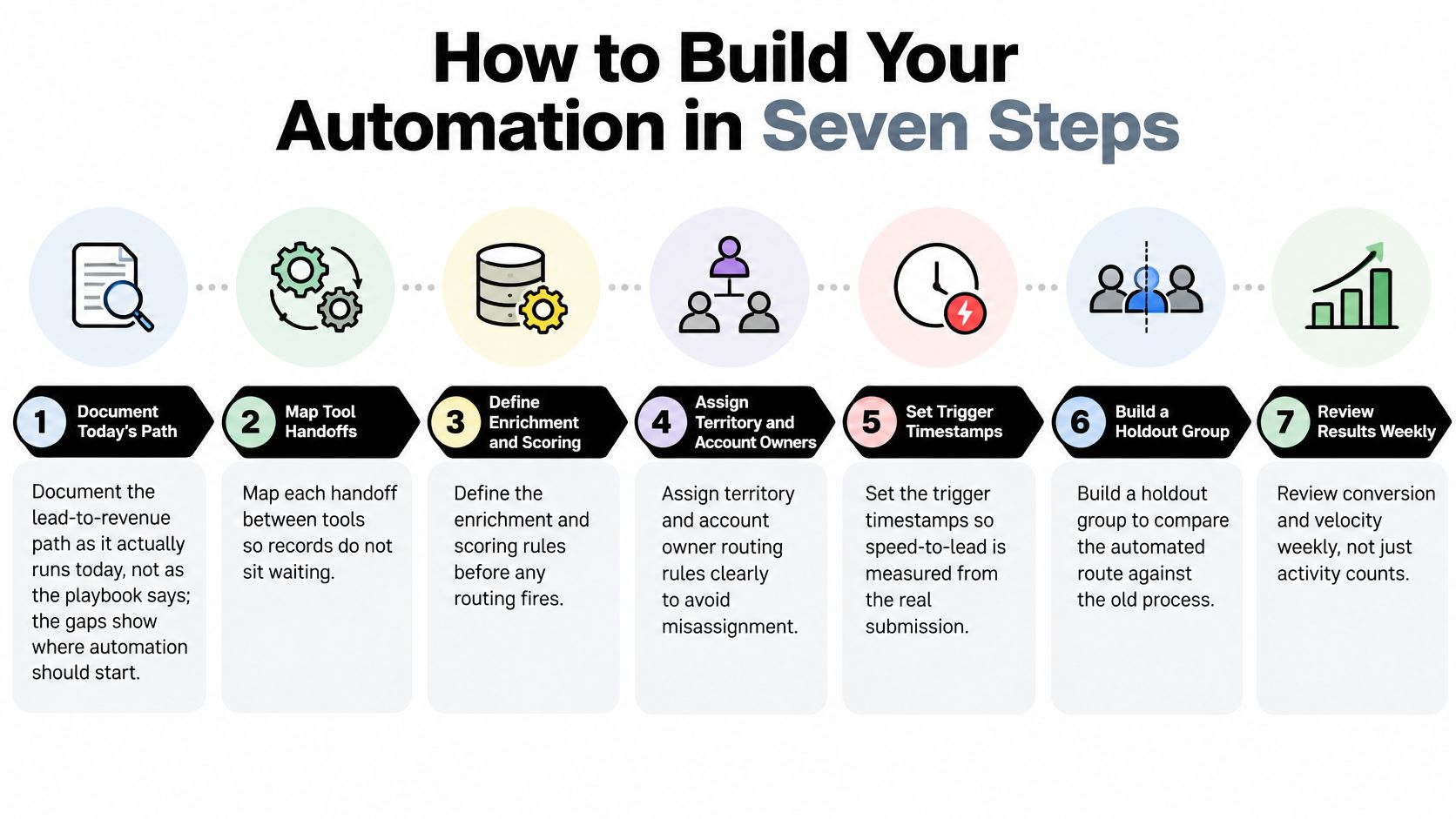
Treat the sequence as a set of gates, each with a named owner and a pass or fail check. The most common failure is a team automating a process that was never defined, then pointing at call volume as evidence it worked.
Expansion rule: the next workflow ships when the last one moved conversion, velocity or forecast accuracy. If only activity moved, the build is still running, not finished.
Four Recipes You Can Ship Tomorrow
Build these in order, because each one feeds the next. Routing without timestamps measures nothing, and escalation without ownership escalates into a void.

Start with speed to lead
The first recipe is the highest-value workflow in any inbound pipeline. Capture the submission timestamp, enrich and score the record, route it by territory and account owner, send a context-specific confirmation, create a human follow-up task, and alert a backup owner if no contact is logged inside 15 minutes.
A lead-response study covering more than 15,000 leads across six companies, summarized by Voiso, found that contacting a lead within five minutes made the odds of reaching that person 100 times higher than waiting 30 minutes, and the odds of qualifying the lead 21 times higher. That's the budget for your escalation logic.
| Time since submission | Required action | Owner |
|---|---|---|
| **0 to 1 minute** | Confirmation email or SMS sent and CRM task created | System |
| **Within 5 minutes** | Human or AI-assisted first contact attempted | Assigned rep |
| **Within 15 minutes** | Backup owner alerted if no contact is logged | System, then backup owner |
| **Within 1 hour** | Second attempt logged and lead visible in manager queue | Rep and team lead |
| **Within 24 hours** | Lead moved to nurture or flagged as stalled | Marketing and sales lead |
The cost of getting this wrong is steeper than many assume. Harvard Business Review researchers audited 2,241 U.S. companies by submitting test leads and found that 23% never responded at all, while the average response time among companies that did respond within 30 days was 42 hours, as reported in this breakdown of speed to lead. Your buyer is hearing from whoever answers first, and 42 hours is three competitors deep.
For a visual walkthrough of how these rules chain together, the video below is a useful companion before you wire the first one.
<iframe width="100%" style="aspect-ratio: 16 / 9;" src="https://www.youtube.com/embed/1pPBxM6VG6g" frameborder="0" allow="autoplay; encrypted-media" allowfullscreen></iframe>Then fill, flag and notify
The remaining three recipes are cheaper to build and just as portable.
- Form to CRM without retyping: push form fields straight onto the opportunity, tag the source, and run a duplicate check against account domain before the record saves. Source tagging matters more than it looks, because it's the only way the qualification rate by source becomes readable later.
- Seven-day inactivity flag: any open opportunity with no logged activity for seven days gets a reminder to the owner with a suggested next action, and a copy to the sales lead if nothing changes in another three. Set the threshold from your own median stage age rather than copying a number from a blog.
- Stage-change handoff: when a deal reaches a stage that needs someone else, notify the marketing or customer-success owner with the context they need, not a bare stage name. These notifications are the difference between a handoff and a mention.
Response test: a sent email is not a response. A response is a human or AI-assisted conversation that moves the lead forward, and anything less should stay in the pipeline as waiting, not as contacted.
Before go-live, submit test leads from each territory and check that the timestamp, routing, confirmation and backup alert all fire inside the windows above. If you're still deciding what the first touch should say, the cold email sequence structure guide is a practical input for the confirmation and follow-up copy, and the wider set of marketing automation workflows shows how these recipes slot into nurture and lifecycle logic. A recipe that hasn't passed a test lead isn't finished.
Measuring Conversion and Velocity Without Activity Traps
Automation that adds meetings and touches can still leave pipeline flat. Meetings booked, emails sent and response rates all rise when you add workflows, because the workflow is designed to produce them. That tells you the system is running. It doesn't tell you the pipeline got better.
The two-week holdout test
Keep a holdout group on the old process for two to four weeks, then compare conversion to qualified opportunity by segment and by buying-committee role. This is the part dashboards rarely cover. The harder constraint is patience, not tooling. A holdout costs you a small amount of coverage in exchange for an answer you can defend to a board.
Adoption quality is a separate test. Research summarized by HubSpot's sales AI research finds AI saves sellers 4.8 hours per week, but only 28% of organizations fully reinvest that time. The same analysis notes that 26% of sales leaders name difficulty adopting new tools as their top operational challenge, while 75% use AI-powered call-recording tools. Narrow, data-rich tasks get used. End-to-end orchestration mostly doesn't, and saved hours with nowhere to go become extra touches.
| Metric | How to calculate | Healthy signal |
|---|---|---|
| **Speed to first contact** | Median minutes from form submit to first human touch | Under 5 minutes |
| **Qualification rate by route** | Qualified leads divided by leads contacted, automated route vs. holdout | Gap holds or grows after tuning |
| **Stage velocity** | Median days from stage entry to exit, per stage | Falling without a drop in win rate |
| **Forecast accuracy** | Forecast against closed revenue at quarter end | Within 10% of actual |
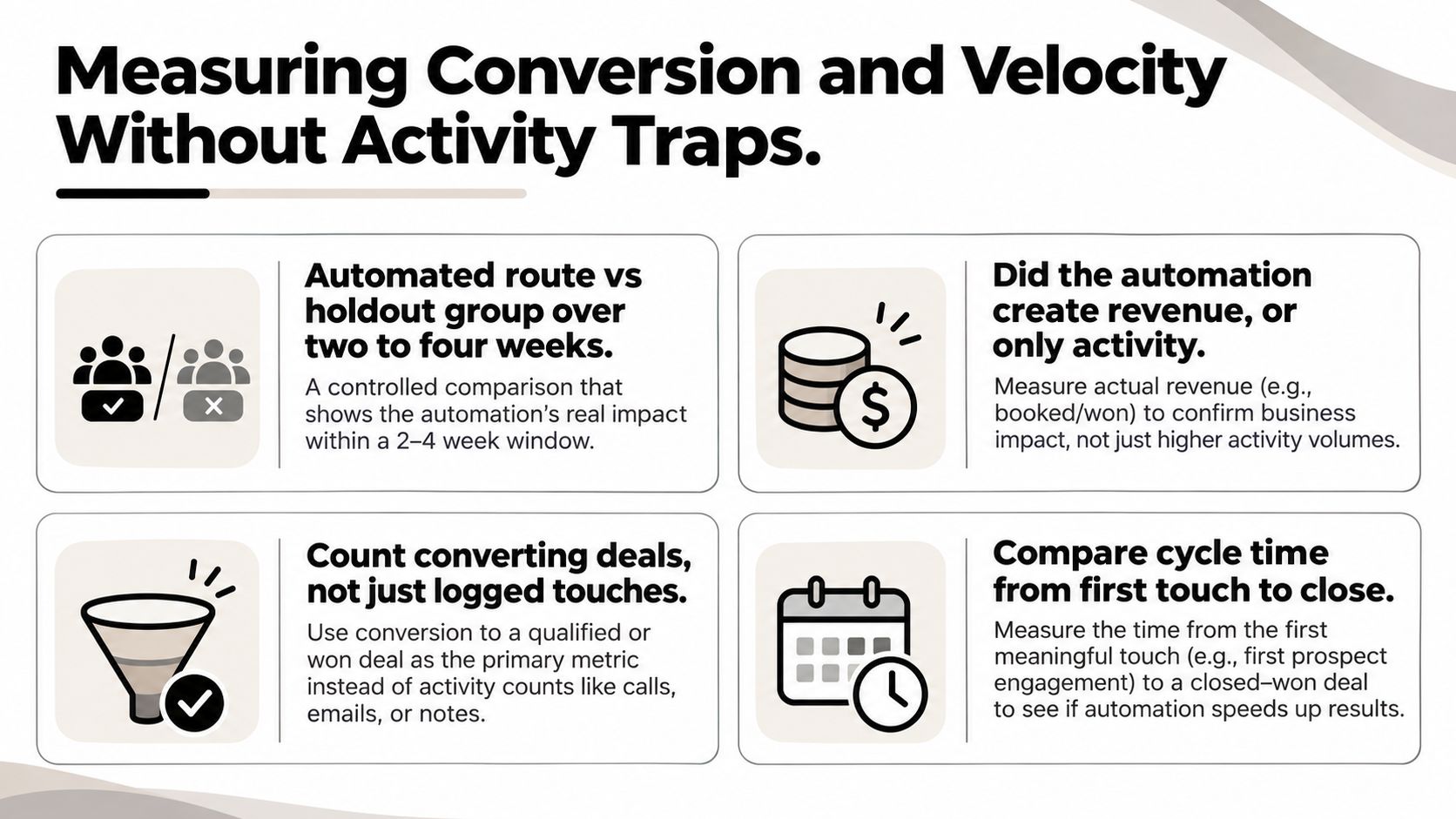
Admin time deserves its own two-week measurement. Research summarized from McKinsey in this analysis of sales admin time reports that automating manual sales administration can return 15% to 20% of a representative's selling time to revenue-generating activity. Test it by comparing hours spent on administration against hours in customer conversations before and after, then confirm that stage changes still meet your data-quality rules. If the freed time lands in more logging, you've converted one form of admin into another.
A pipeline dashboard worth opening shows route-level conversion and velocity against forecast accuracy, not a leaderboard of touches, and building a sales pipeline dashboard that survives scrutiny starts with these four numbers.
Removal rule: drop any workflow that lifts meetings, response rates or touches without moving qualified pipeline, win rate or margin. Attractive efficiency metrics are not a reason to keep a rule alive.
Aligning Sales, Marketing and Buyers Who Research First
The instinct to automate every anonymous visitor is the one worth challenging. Recent reporting in The Drum cites that 69% of B2B buyers complete their purchase process before speaking with sales, and 61% prefer a rep-free experience, with buyers using AI to compare vendors and build internal business cases before any vendor contact. Your pipeline increasingly begins before a prospect has an identity in the CRM.
That changes what automation is for. Sequences aimed at someone who has already shortlisted you read as noise. The better use of the system is routing reps into the moments where a human changes the outcome: complex objections, business-case validation, procurement, risk reduction and negotiation.

For anonymous research, treat clarity as pipeline work. A buyer, or the AI assistant doing their comparison, should be able to understand your product information, customer evidence and pricing logic without a call. If that content needs a rep to explain it, no workflow will rescue the page.
One handoff rule beats three status meetings
Align the two teams through a single shared record. When a stage changes, the next owner gets a notification with context attached, not a bare alert. Set an explicit handoff rule: a rep accepts or rejects the lead within one business day, or it returns to marketing. Silence is not acceptance, and unowned leads are the most expensive kind.
Name the buying committee on every opportunity, not just the first contact. Automation nudges whoever is on the record, so a missing stakeholder is an unmade decision. Mapping demand from the first anonymous signal through to a named committee is covered in this guide to B2B demand generation, which is the layer that decides whether the sales conversation starts warm or cold.
The question to settle before the next workflow ships: which moment in your buyer's journey still needs a human, and does your automation know to get out of the way until then?
Confirm Your Stage Map This Week
Monday is enough time to start, and none of these five steps needs a new tool.
- Export the last 90 days of opportunities and find where deals stalled most often. That's your first fix, not the workflow you were most excited about.
- Write a one-sentence entry rule for each stage using the first table, and delete any stage nobody can define. Expect to lose one, maybe two.
- Pick one speed-to-lead recipe and pilot it on a single segment for two weeks. One workflow, one segment, one measurable change.
- Track the four metrics from the measurement table, starting with speed to first contact, qualification rate by route and forecast accuracy. Record the baseline before the rule goes live, or you'll be arguing from memory later.
- Review the results with sales and marketing in the same room before expanding anything. Two functions reading one number is worth more than another dashboard.
If an outside read helps first, a diagnostic that maps acquisition, conversion and retention, checks tracking and attribution, and drafts a first-sprint roadmap settles which stage is broken with data instead of opinion.
The automation that survives is the one your team trusts enough to keep running. Trust comes from rules that match how deals move, and from numbers that hold up when someone asks a hard question.
Sprints & Sneakers builds the automation layer this article describes: CRM structure, lead scoring, nurturing workflows and sales handoffs that move leads through the pipeline on rules your team can keep. If the stage map is written and the workflows still aren't holding, their growth scan will find the single bottleneck first and put a first-sprint roadmap behind it. Start at Sprints & Sneakers.
Related articles

Frequently asked questions
Growth marketing, AI and automation, SEO, performance marketing, retention strategies, and sustainable business practices.
Weekly. Subscribe to our newsletter to get new articles straight to your inbox.
Absolutely. Everything we publish is designed to be actionable. Take it, test it, and make it your own.
Yes. We publish experiments with real numbers. What worked, what didn't, and what we learned.
Our growth team — strategists, performance marketers, data specialists, and AI builders who work on client campaigns every day.
We're open to it. Reach out via our contact page with your topic and we'll take a look.