
Marketing Automation in CRM: How It Works and How to Start
Learn how marketing automation in CRM works, from lead scoring and nurturing to data checks, metrics and a launch checklist for B2B and e-commerce teams.
Only 51% of organizations considered their CRM data clean enough to support insights, according to a data-quality study. That figure changes where marketing automation should begin. Before building an email sequence, check whether customer records are accurate enough to guide its decisions.
A workflow can follow its rules and still contact the wrong person. It can also create activity without adding revenue. Treat automation like a delivery route: sound instructions cannot fix a wrong address. Start with reliable records and clear handoffs, then use a controlled holdout group to compare outcomes with customers who did not receive the workflow.
Table of Contents
- What Marketing Automation Inside a CRM Does
- How Data Moves Between Your CRM and Automation Tools
- Data Rules to Set Before You Switch Anything On
- Acquisition and Retention Workflows That Pay Off
- Metrics That Prove Automation Is Working
- Launch Your First Workflow This Week
- Keep CRM Workflows Auditable After Launch
What Marketing Automation Inside a CRM Does
A trial user visits a pricing page, requests a demo, and then goes quiet. CRM marketing automation can update the contact record, apply agreed scoring rules, and start the next action without requiring someone to monitor every step.
Marketing automation in CRM is software that sends messages, scores and routes leads, and updates marketing actions using customer information held in the CRM. The connection matters more than whether the software sits inside the CRM or connects through an integration. If the record is inaccurate, automation can act on the wrong person or send a message that ignores their current relationship with the business.
In global research covering nearly 7,000 marketing professionals, 63% of marketers used the same CRM as sales and service, according to the State of Marketing report. Shared records give these teams a common view of customer status, ownership, and recent engagement.
Core marketing automation features inside a CRM
These examples show how a team might configure workflows. They are illustrative workflow rules, not validated scoring weights or universal recommendations.
| Feature | What it does | CRM data it reads | Example |
|---|---|---|---|
| Lead scoring | Adds points for fit and behavior | Industry, company size, page visits, form fills | An illustrative score adds +10 for a pricing visit and +25 for a demo request |
| Segmentation | Builds live lists from current fields | Industry, plan, lifecycle stage, last purchase | Healthcare trial users with no login in 7 days |
| Nurturing | Runs stage-specific email and task sequences | Lifecycle stage, engagement date, content viewed | A five-email sequence after a lead reads two case studies |
| Lead routing | Assigns an owner and alerts sales | Region, account size, owner field | Enterprise accounts in the Benelux go to the senior account executive within minutes |
| Lifecycle triggers | Moves contacts between stages automatically | Deal stage, purchase event, subscription status | A closed-won deal changes a contact from lead to customer |
| Suppression | Stops outreach to contacts who shouldn't receive it | Consent status, customer status, unsubscribe flag | Existing customers leave the acquisition campaign |
Consider an existing customer who asks about another product. If the workflow checks customer status, it can create a task for the account owner instead of sending an introductory acquisition sequence. That small rule keeps the next step relevant.
These choices belong in marketing operations, where teams set shared definitions, responsibilities, and system behavior. After a lead is routed, the sales outreach insights from Flowkon can help teams plan the human follow-up.
Practical test: If the automation can't read or write a CRM field, it's a standalone email tool rather than CRM marketing automation.
On Monday, inspect one active campaign. Find the CRM field that starts it, the field it changes, and the condition that stops it. Then ask what happens if any of those fields is missing or out of date.
How Data Moves Between Your CRM and Automation Tools
A lead books a meeting, but the deal stage never updates in the CRM. Marketing keeps sending nurture emails, and sales sees no record of the reply. This kind of broken write-back turns automation into disconnected activity instead of a shared customer history.
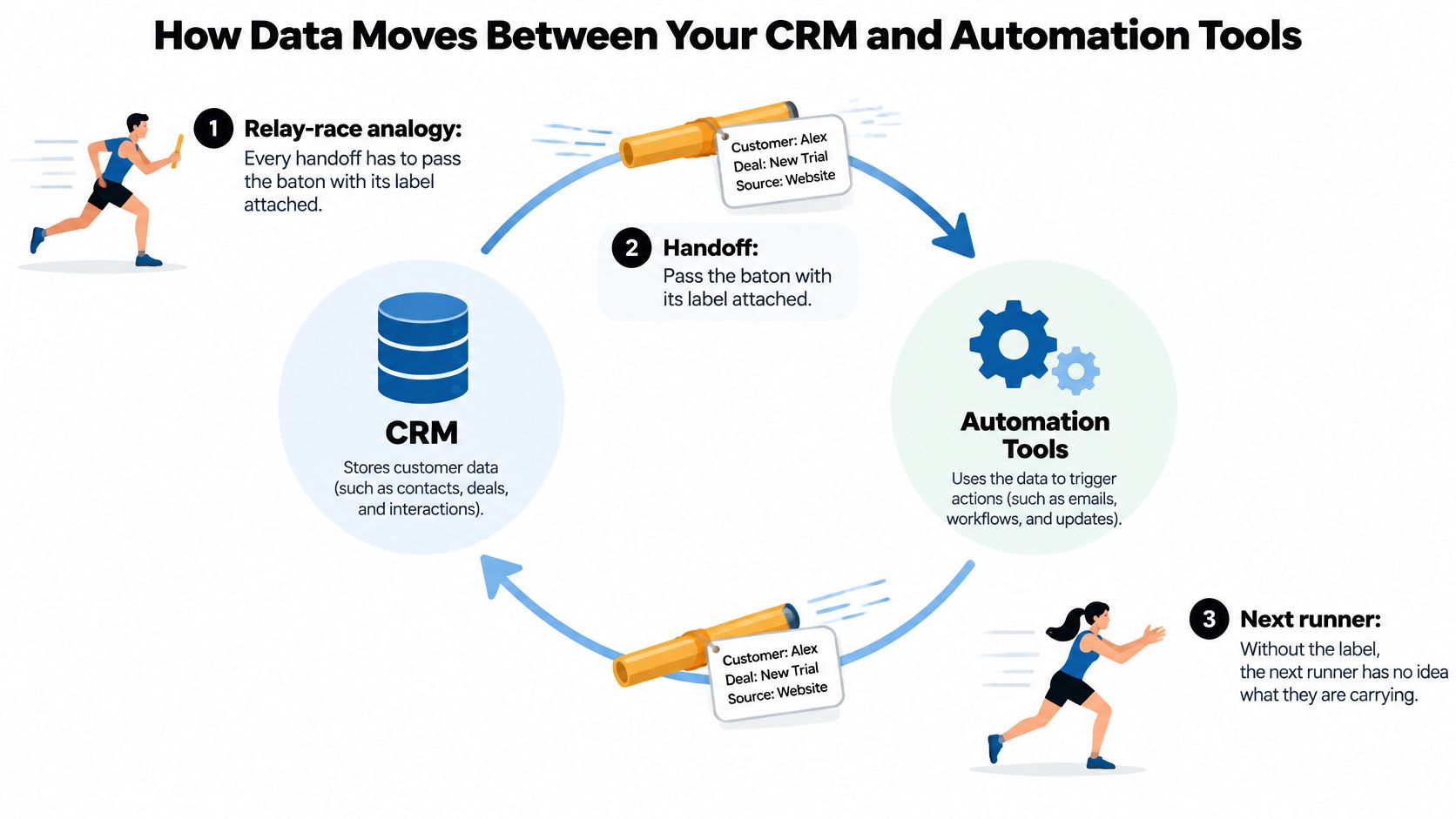
The closed-loop journey
- Capture the event. A form submission, page visit, or product action reaches the contact record with its time and source.
- Enrich the record. Industry and headcount add context for judging whether the business fits the intended audience.
- Match and deduplicate. The integration checks whether the person or company already exists before creating a new record.
- Score fit and intent together. A suitable company showing buying behavior should rank differently from one browsing casually.
- Route and alert. When a contact meets the agreed threshold, assign an owner and explain why the alert was sent.
- Nurture by stage. Contacts who aren't ready for sales receive relevant guidance, while active buyers get a different follow-up.
- Write results back. A meeting, reply, or deal-stage change updates the shared customer history.
- Connect the outcome to revenue. Opportunity records show what happened next. They do not prove that every recorded interaction caused the sale.
A lead-management benchmark linked enrichment and nurturing with higher ROI. It reported monthly database-lead-to-sales-ready conversion of approximately 4% on average, compared with 8.5% for best-in-class marketers. Treat these as context, not a forecast for your integration.
Define events before connecting systems
A shared event schema gives both systems the same definitions for page depth, pricing visits, product usage, form completion, email engagement, company fit, and buying stage. Without agreed meanings, a score or trigger can act on the wrong signal.
For example, one system might call an account “activated” as soon as someone creates it, while another uses that label only after setup is complete. A first-party data strategy can help your team agree on what to collect and how to use it.
Check write-back before launch. A send log can show that an email went out while the commercial history stays empty. Sales needs the meeting outcome and stage change, not just the email activity.
Set the CRM as the source of truth, and name an owner for each synchronized field. Limit two-way updates so one system cannot overwrite decisions owned by the other. On Monday, draw the data loop and label each arrow with the field it reads or writes.
Data Rules to Set Before You Switch Anything On
Experian's research found that roughly one-third of customer and prospect data was inaccurate (Experian research). Automation applies the values in a CRM, including incorrect ones. Before switching on customer-facing actions, set rules for which records can enter a workflow and what happens when required information is missing.
For example, a missing owner can leave an inquiry unattended. An outdated customer flag can send an acquisition message to someone who has already purchased. Clear entry requirements help prevent both.
Minimum CRM field standards before automation
The standards below are proposed settings for an initial audit, not research benchmarks. The sample size and source-completeness target are starting points for checking your records.
| Field | Minimum standard | Quick check |
|---|---|---|
| Email address | Present and syntax-valid | Check bounces in an existing, permissioned sample of 100 contacts |
| Lifecycle stage | A value from a controlled list | Find values outside the list |
| Consent status | Explicit and dated | Measure the share with no consent record |
| Source | Captured on every new record | Measure unknown sources, with a proposed target under 5% |
| Owner | Assigned before routing starts | Find leads entering routing without an owner |
| Company domain | Normalized, with consistent spelling | Review repeated domains across accounts |
| Last engagement date | Updated automatically by the workflow | Find records with no date |
A valid email format does not prove the mailbox exists. A consent field also needs to match the communication you plan to send. Send failed checks to an exception queue. Do not let those contacts enter a workflow without review.
Resolve identity before merging history
A 50,000-contact database with a 10% duplication rate contains 5,000 duplicate records, as shown in this duplicate-record management example. Duplicate records can split a person's activity history or cause repeated outreach.
Set matching rules before merging. For people, start with normalized email addresses. For companies, combine domain, legal name, and country. A shared domain or subsidiary can make a match uncertain, so send possible matches for review instead of merging them automatically.
A CRM data-quality paper reports 91% incomplete records, 70% containing some duplication, and critical errors in 25% of an average B2B database. These figures do not describe every CRM. They do show why testing only a clean sample record can miss problems.
Before launch, test cases that expose likely edge cases:
- Multiple identities: A person has different email addresses.
- Account complexity: A company has several subsidiaries.
- Customer re-entry: An existing customer submits a new form.
- Communication restrictions: A contact has unsubscribed.
- Missing context: A lead has no industry or company-size value.
For a practical audit, export records and count missing emails, missing required fields, and possible duplicates. Then ask each field owner to classify failures: which ones block automation, and which ones can wait for manual review? That decision turns a list of data problems into clear workflow rules.
Acquisition and Retention Workflows That Pay Off
Faster response is a sensible first candidate for improvement. Research summarized across 55 million sales activities and 5.7 million inbound leads found an approximately eightfold conversion advantage for contact within five minutes versus beyond 30 minutes; related findings reported 100 times higher contact rates across that timing comparison, according to this lead-response-time research summary.
Those findings aren't a guaranteed lift for another business. They do make delayed handling worth investigating before a team builds a complicated nurture program.
The operational focus is the person ready to respond, not merely the message waiting to send.

Workflows to build first, by model
Timing and sequence lengths in this table are example configurations to test, not industry benchmarks.
| Workflow | Model | Trigger | CRM action | Success signal |
|---|---|---|---|---|
| Inbound demo request | B2B SaaS | Form submitted | Deduplicate, assign owner, create task, send meeting link | Valuable touch within the response window |
| Pricing page alert | B2B SaaS | 3 or more pricing visits in 7 days | Raise account score and alert owner | Qualified meetings or opportunities |
| Event no-show follow-up | B2B SaaS | Registered but didn't attend | Send recording and create follow-up task | Next-session attendance or replies |
| Cart abandonment | E-commerce | Cart idle for 60 minutes | Three-email sequence, suppressed after purchase | Share of abandoned carts recovered |
| Onboarding activation | B2B SaaS | No key action within 3 days of signup | Send setup guide and create success task | Completion of the activation event |
| Replenishment reminder | E-commerce | 30 days after last order | Segment by product and send reorder link | Repeat purchase rate |
| Churn-risk alert | B2B SaaS | Weekly logins below prior 4-week average | Create account-manager task and in-app message | Save rate among at-risk accounts |
| Win-back sequence | E-commerce | No purchase for 90 days | Three-step offer sequence, then suppress nonresponders | Reactivated customers per 100 eligible contacts |
Acquisition needs a useful next step
Acquisition workflows help prospective buyers continue an action they've already started. A demo request should receive a relevant meeting route. A pricing alert should give the owner account context, not just a notification that someone visited a page.
An event no-show needs different treatment. A recording and a short explanation of the useful material provide a reason to engage without pretending the registrant attended.
For B2B accounts with several stakeholders, the team should evaluate the account, not only the most active person. A researcher downloading material and a decision-maker requesting implementation details represent different signals.
Retention needs different stop rules
Retention workflows help customers use, replenish, or return to a product. A SaaS onboarding message should point toward the missing setup action. A churn-risk alert should prompt investigation, since lower usage doesn't automatically mean dissatisfaction.
For an e-commerce workflow built around frequent order events, stopping messages after purchase can matter more than maintaining a complex lead score. A consumable product may suit replenishment reminders, while a durable purchase needs a different timetable.
A lifecycle marketing strategy connects these journeys without treating every customer as an acquisition prospect.
A receipt confirms that a message arrived. A valuable touch helps the buyer take the next step.
A meeting link, setup guide, or relevant answer is more useful than a generic thank-you. The operational metric should therefore count qualified inbound leads receiving a valuable human or automated touch, not merely an acknowledgement, within the response standard.
Metrics That Prove Automation Is Working
Email opens and clicks show activity, not revenue. A workflow earns its place when eligible contacts progress further than comparable contacts would have progressed without it.
The nurture benchmarks cited earlier offer context, but a team still needs its own baseline. Different definitions of “sales-ready” can make apparently similar conversion rates impossible to compare.
Success metrics for CRM marketing automation
| Metric | How to calculate | Benchmark or target | Where to read it |
|---|---|---|---|
| Speed to lead | Share of qualified inbound leads touched within the response standard | Meet the high-intent response standard | CRM activity timestamps |
| Nurture conversion | Database leads becoming sales-ready each month | Compare with the earlier benchmark and internal baseline | CRM stage history |
| Sales-ready rate | Sales-ready leads divided by leads entering nurture | Establish during the initial reporting period | CRM lifecycle report |
| Lead-to-opportunity rate | Opportunities created divided by sales-ready leads | Establish an internal baseline | CRM pipeline report |
| Time to qualification | Median time from first touch to qualification | Improve without reducing lead quality | CRM stage timestamps |
| Holdout lift | Automated-group conversion minus holdout conversion | Positive, with adequate statistical evidence | Experiment report |
| Data completeness | Share meeting required field standards | All routed records pass entry requirements | Data-quality dashboard |
If delivered messages produce little response, a MailGenius inbox placement test can support a delivery investigation. That's a diagnostic check, not evidence of commercial impact.
Measure the difference, not the credit
For a starting experiment, a team might randomly reserve about 10% of eligible contacts as a holdout. That's a proposed allocation, not a universal sample-size rule. The holdout receives normal service but doesn't receive the workflow being tested.
Subtracting holdout conversion from automated-group conversion gives an absolute difference in conversion rates. Random assignment, a shared observation period, and sufficient outcomes make that comparison more informative than comparing this month's results with an unrelated audience.
For B2B tests, assignment may need to happen at account level so colleagues don't enter opposing groups. Response-time analysis should also compare the earlier timing bands while accounting for source, segment, company size, and intent.
The 2025 State of Marketing Attribution report warns that automation tools don't send all engagement into the CRM, leaving roughly half of actual touchpoints potentially missing. Fractional credit can't repair an incomplete journey.
A marketing analytics dashboard should therefore combine cohort pipeline results, experimental lift, and uncertainty ranges. Small samples should be labeled inconclusive rather than presented as precise wins.
Reporting rule: A headline performance number needs a traceable CRM stage change, revenue outcome, or holdout comparison.
Launch Your First Workflow This Week
A demo-request handoff can make a useful first workflow when qualified inquiries already arrive but receive inconsistent follow-up. Choose a process that changes a revenue stage, relies on audited CRM fields, and can produce an observable result within an illustrative 30-day review window. The checklist separates choosing the workflow from preparing it.
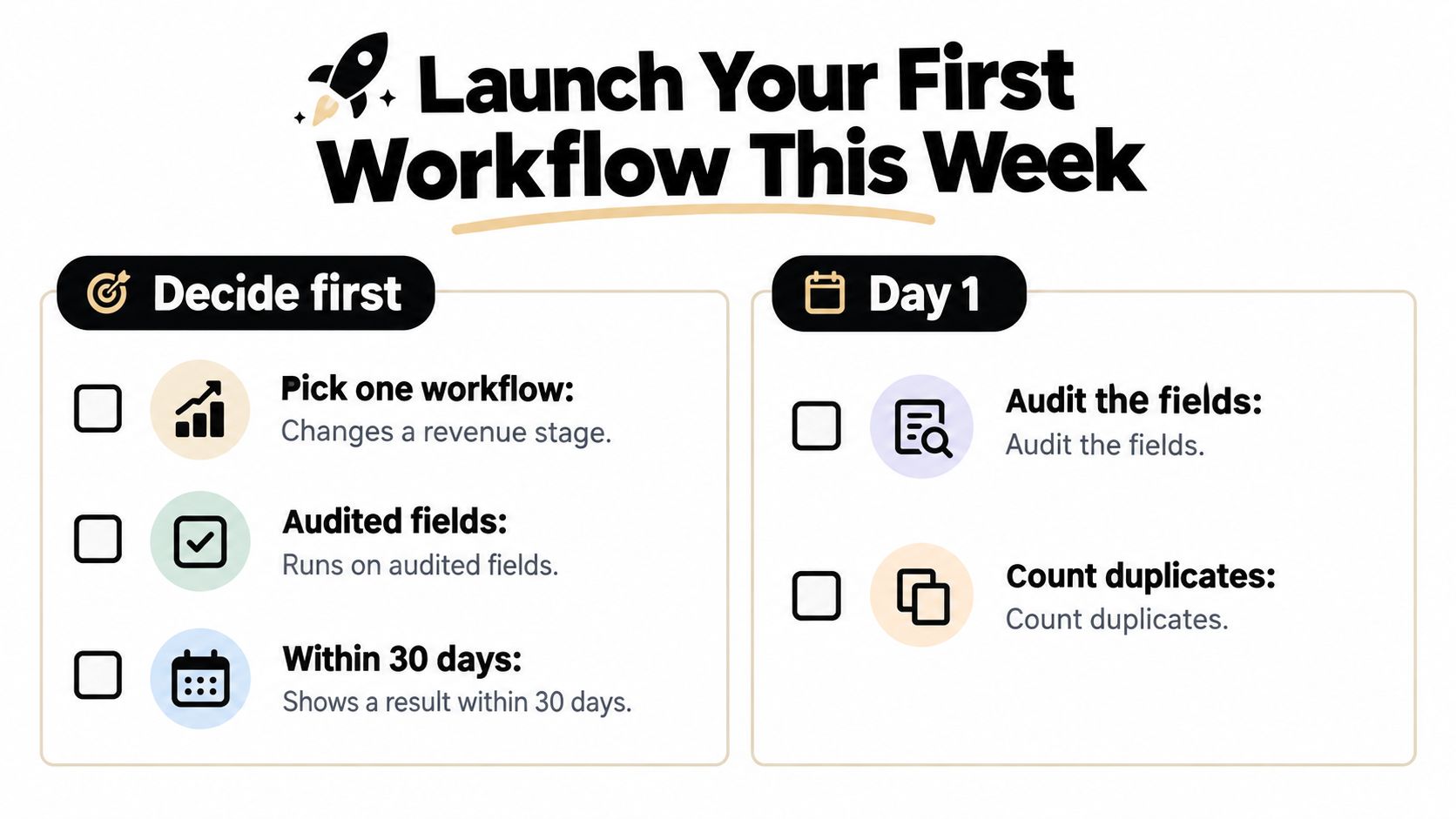
A working-week launch plan
Day 1, confirm eligibility. The CRM owner checks required fields and counts potential duplicates. Marketing and sales agree which contacts may safely enter the workflow.
Day 2, define the outcome. Write down the intended stage change and how the team will verify it. For a demo handoff, that could mean meeting the response standard already in use, then tracking whether the inquiry is qualified.
Day 3, connect the full path. Set up the trigger, fit-and-intent score, sales-review threshold, owner, and write-back. Add an escalation for tasks that remain unaccepted, so inquiries do not sit unnoticed.
Day 4, test exceptions. Reuse the edge-case contacts described earlier. Check segment, suppression, owner, and follow-up, then confirm that updates preserve history instead of creating another record.
Day 5, start under controlled conditions. Enroll eligible contacts according to the experimental allocation. Log manual corrections and schedule the review before widening the audience.
Treat these days as a proposed schedule. A failed consent or identity check overrides it. Pause until the issue is resolved.
Turn corrections into operating rules
A survey of enterprise leaders cited in this data-governance discussion found respondents spent 30% of enterprise time on non-value-added tasks associated with poor data quality and availability. A correction log helps the team spot which problems it can prevent in its own CRM.
Classify each manual repair:
- Duplicate: Another record already represents the person or account.
- Incomplete: A required field is missing.
- Outdated: Information that was once correct needs refreshing.
- Wrongly formatted: A value does not follow the agreed standard.
- Wrongly assigned: Ownership or routing needs correction.
Patterns point to practical fixes. Repeated formatting repairs call for validation rules. Repeated ownership repairs point to a routing issue. The log turns individual corrections into a focused improvement queue.
For email workflows, the operator can test your SMTP server as part of checking the sending path. Confirm delivery readiness separately from contact eligibility and commercial results.
A related implementation video provides another way to review the setup.
<iframe width="100%" style="aspect-ratio: 16 / 9;" src="https://www.youtube.com/embed/3dbZ-WOArMI" frameborder="0" allow="autoplay; encrypted-media" allowfullscreen></iframe>Use this marketing automation workflow guidance to support planning, while keeping the first launch narrow. A faster handoff, stronger qualification, or credible lift in a controlled test is more useful than a large set of untested sequences.
Keep CRM Workflows Auditable After Launch
A workflow can pass launch tests and still become unsuitable as the CRM changes. Sales territories shift, product teams redefine activation, customers change plans, and integration owners update field mappings. Treat review as routine maintenance, like checking that a route still leads to the right destination.
Assign someone the authority to pause a workflow, investigate unexpected behavior, and approve its restart. That responsibility keeps a small data or process change from triggering the wrong customer action.
Review a real customer history
Open an enrolled contact's CRM record and trace what happened. Check that the trigger is visible, the eligibility decision makes sense, and the action fits the customer's current situation.
For example, an account may already be negotiating a purchase when a new contact at the same company downloads introductory material. Starting a separate prospecting sequence could confuse the customer. Notifying the existing account owner may be the better action.
Use these checks during review:
- Context: Did the workflow use current account and customer status?
- Explanation: Can a colleague see why the contact qualified?
- Responsibility: Is a named person responsible for exceptions?
- Recovery: Can the team stop an incorrect action while preserving its history?
- Measurement: Does the reported outcome match the intended stage change?
Human review belongs where uncertainty could lead to a costly or inappropriate action, such as an unclear account merge or conflicting communication permissions. For routine actions with clear records and rules, review the workflow and its exceptions rather than approving every message individually.
Agree on pause conditions
Write down the conditions that require a workflow to stop. Examples include missing ownership, a failed suppression check, unexpected record creation, or a synchronization error that makes customer status uncertain.
| Observation | Appropriate response |
|---|---|
| Customer status can't be confirmed | Pause acquisition outreach for the affected records |
| A merge would combine conflicting histories | Send the match to manual review |
| Tasks arrive without owners | Stop routing and repair the assignment rule |
| Reported outcomes can't be reconciled | Withhold the performance conclusion |
| The test is inconclusive | Continue observation or redesign the experiment |
Separate technical reliability from commercial results. If delivery works but the workflow shows no measurable commercial improvement, the setup may be technically sound while the underlying action needs a new hypothesis. For instance, the action may not help that audience enough. A technically unreliable workflow needs repair before more testing; a reliable but ineffective one needs a different hypothesis, not more complicated scoring.
Colleagues should be able to explain what happened, identify who owns the next action, and point to the evidence for continuing. Expand a workflow carefully when those checks hold. Keep it paused when the team cannot trust its behavior.
Sprints & Sneakers offers a personalized growth scan to identify the bottleneck limiting CRM-connected acquisition, activation, or retention. Teams ready to replace disconnected campaigns with auditable workflows can visit Sprints & Sneakers to discuss their CRM setup, measurement gaps, and first controlled experiment.
Related articles


Retention marketing: why it will be the key to profitable growth in 2026
Acquiring new customers is more expensive. That’s why more companies are focusing on retention. Retaining customers is often more profitable than acquiring new ones. Especially now that AI can better predict behavior, personalize experiences and intervene in the event of churn.

Frequently asked questions
Growth marketing, AI and automation, SEO, performance marketing, retention strategies, and sustainable business practices.
Weekly. Subscribe to our newsletter to get new articles straight to your inbox.
Absolutely. Everything we publish is designed to be actionable. Take it, test it, and make it your own.
Yes. We publish experiments with real numbers. What worked, what didn't, and what we learned.
Our growth team — strategists, performance marketers, data specialists, and AI builders who work on client campaigns every day.
We're open to it. Reach out via our contact page with your topic and we'll take a look.