
Email Deliverability Issues: A Practical Fix-It Playbook
Fix email deliverability issues step by step: authentication, complaint rates, list hygiene, warm-up and monitoring, with checklists you can use tomorrow.
The most popular fix for email deliverability issues is also the most wasteful one. Opens drop, someone rewrites the subject lines, trims a few "spammy" words, sends again, and watches the same result. That sequence assumes readers saw the message and rejected it. Often they never saw it at all.
Deliverability isn't a copy problem first. It's a diagnosis problem spread across DNS records, vendor platforms, list sources, complaint signals and people who don't share the same dashboard. A message can be accepted by a server, counted as delivered in a report, and still sit in spam or vanish entirely. The useful question isn't "how do we make this email better?" It's "at which stage did this email fail, and who owns that stage?" Answer that, and the fix usually becomes obvious, cheap and fast.
Table of Contents
- Diagnose Where Your Email Actually Fails
- Fix Authentication Alignment for SPF, DKIM and DMARC
- Check IP and Domain Reputation Before Blaming Content
- Keep Spam Complaint Rates Under the Line
- Clean Your List and Make Unsubscribes Work
- Warm Up New Domains and IPs Without Burning Them
- Assign Owners and Run the Monitoring Routine
- Confirm the Fix Holds Before You Scale Volume
Diagnose Where Your Email Actually Fails
| Symptom | Failing stage | First check | First fix |
|---|---|---|---|
| Opens fall while sends show as accepted | Inbox placement | Run a seed-list test and compare placement by provider | Fix authentication and complaint rates before rewriting copy |
| Bounces rise on one list source | Address validity | Sort bounces by source and signup date | Remove unverified addresses and re-confirm opt-ins |
| Mail reaches spam at one provider only | Spam filtering | Check that provider's postmaster dashboard for complaint rate | Lower complaints in the affected segment |
| Messages missing with no bounce notice | Provider rejection or throttling | Read the SMTP response codes in logs | Slow volume and correct DNS records |
| Authentication fails for one sending tool | Authentication | Inspect raw headers for SPF and DKIM results | Add the tool to SPF and sign with an aligned DKIM domain |
A receiving server accepting a message only proves transmission, not inbox placement. The mail can still be filtered to spam or go missing after acceptance. The Validity 2025 benchmark report recorded an 84.8% inbox placement rate, with 6.1% placed in spam and 9.1% classified as missing. On a 100,000-message send, that's roughly 84,800 inboxes, 6,100 spam folders and 9,100 messages nobody can account for.
Those numbers change the conversation. An open-rate drop may mean 15,200 people never had the chance to engage, not that the audience lost interest. For nurture sequences, onboarding mail and renewal reminders, invisible mail also corrupts attribution, because the funnel blames content for a placement failure. A useful companion read on why delivered emails get no replies makes the same distinction between delivery and actual visibility.
Run the Diagnostic in Order
Start with provider response codes in the sending logs, since rejections and deferrals name the problem directly. Next, run a seed-list test by sending one live campaign message to test addresses at Gmail, Outlook and Yahoo, then recording whether each lands in the inbox, in spam or nowhere. Compare placement by provider, because a Gmail-only failure points to different causes than a failure everywhere. After that, segment by campaign and acquisition source to find which stream carries the damage.
The failing stage decides the fix. Copy gets rewritten last, not first.
That order also protects broader engagement work. Teams refining customer engagement across the funnel need placement data before engagement data, otherwise they're optimising messages for an audience that never received them.
Fix Authentication Alignment for SPF, DKIM and DMARC
| Record | Where to check | Pass condition | Common break |
|---|---|---|---|
| SPF | DNS TXT record on the sending domain | Lists every authorized platform and stays under 10 DNS lookups | A new tool added without updating the record |
| DKIM | Raw message header | Signature passes and the d= domain matches the From domain | Signing with a vendor domain that does not align |
| DMARC | DNS TXT record at _dmarc on the domain | Record exists with a reporting address and sources pass alignment | Moving straight to reject and blocking legitimate mail |
| Reverse DNS (PTR) | Reverse lookup on the sending IP | Resolves back to the sending host name | Missing PTR record on a dedicated IP |
Authentication work starts with an inventory, not a DNS editor. List every sending platform, CRM, support tool, billing system and campaign subdomain that sends under the company domain. Forgotten tools cause most failures, because each one needs its own authorisation and signing setup.
The failure is usually alignment, not one broken record. The visible From domain must match either the SPF-authenticated domain or the DKIM signing domain. Gmail's sender guidelines describe authentication as part of a wider infrastructure check, and for senders at 5,000 or more messages per day to Gmail they also require valid forward and reverse DNS records and low complaint rates.
The Four Breaks That Cause Most Failures
- SPF lookup overflow: Every added platform consumes DNS lookups, and passing the 10 lookup limit breaks the record for every sender listed in it.
- The unlisted SaaS tool: A platform migration adds a new sender, nobody updates SPF, and that stream fails while the main one passes.
- Vendor-domain signing: A tool signs DKIM with its own domain instead of the sender's, so the signature validates but doesn't align with the From address.
- Orphaned subdomains: The root domain gets authenticated while campaign subdomains send unmanaged, and failures there still reflect on the brand.
Validation is straightforward. Send a test message from each stream, open the raw headers and confirm SPF and DKIM show pass results with aligned domains. Then read the DMARC aggregate reports, which list every source sending under the domain, including the ones the inventory missed.
Roll Out DMARC in Stages
Start DMARC with a monitoring policy and a reporting address, then review reports for a few weeks while fixing every legitimate source that fails. Move to enforcement only once real mail passes consistently. Jumping straight to a reject policy feels decisive and frequently blocks invoices, password resets and support replies from a tool nobody listed. Staged enforcement trades a little speed for the certainty that enforcement won't break revenue mail.
Check IP and Domain Reputation Before Blaming Content
Reputation decides how much trust mailbox providers extend before they evaluate content at all. A weak reputation sends good messages to spam, while a strong one gives average messages a fair hearing. That makes reputation the second check, right after placement.
Start with domain reputation in Gmail Postmaster Tools, reading the reputation status and spam rate trend for the last 30 days rather than a single day's snapshot. For a dedicated IP, check Microsoft SNDS for Outlook.com traffic and confirm whether the IP is shared. Then look up the sending IP and domain in the major DNS blocklists.
A blocklist listing is a fact to act on, not a verdict. Trace the cause before requesting removal, because delisting without fixing the source usually leads to a faster relisting. Shared infrastructure adds another wrinkle, since another sender's complaints can drag placement down for everyone in the pool. Ask the vendor for its complaint history, and move to a dedicated IP only when volume justifies the cost and the warm-up work.
The visibility gap is wide. In a 2025 Sinch Mailjet survey, only 25.5% of surveyed senders said they had a strong understanding of their sender reputation, according to the Sinch Mailjet Road to the Inbox takeaways. In the same survey series, 48% of surveyed senders identified staying out of spam as a major challenge, per the Sinch Mailjet deliverability in 2025 chapter.
The decision rule is simple. Clean reputation with falling placement points toward content or engagement. Poor reputation points toward infrastructure, complaints or list source. Record the findings on one page the accountable owner can read in two minutes.
Keep Spam Complaint Rates Under the Line
| Threshold | Source | What it means | Action |
|---|---|---|---|
| Below 0.10% | Gmail recommendation | Healthy sending range | Keep checking the daily rate in Postmaster Tools |
| 0.05% | Internal alert for scale-ups | Early warning | Suppress complainers and review the segment |
| 0.30% or higher | Gmail enforcement | Delivery mitigations removed | Pause volume and fix the cause |
| 0.30% ceiling | Yahoo spam complaint rule | Risk of deferred mail | Reduce sends to the affected segment |
| Below 0.30% for seven consecutive days | Gmail recovery rule | Eligibility returns | Release sends in cohorts |
Complaints are a leading indicator. They expose relevance and consent problems well before hard bounces do, because a recipient who reports spam is giving direct evidence the message felt unwanted. Bounces only prove an address problem. Complaints prove an audience problem.
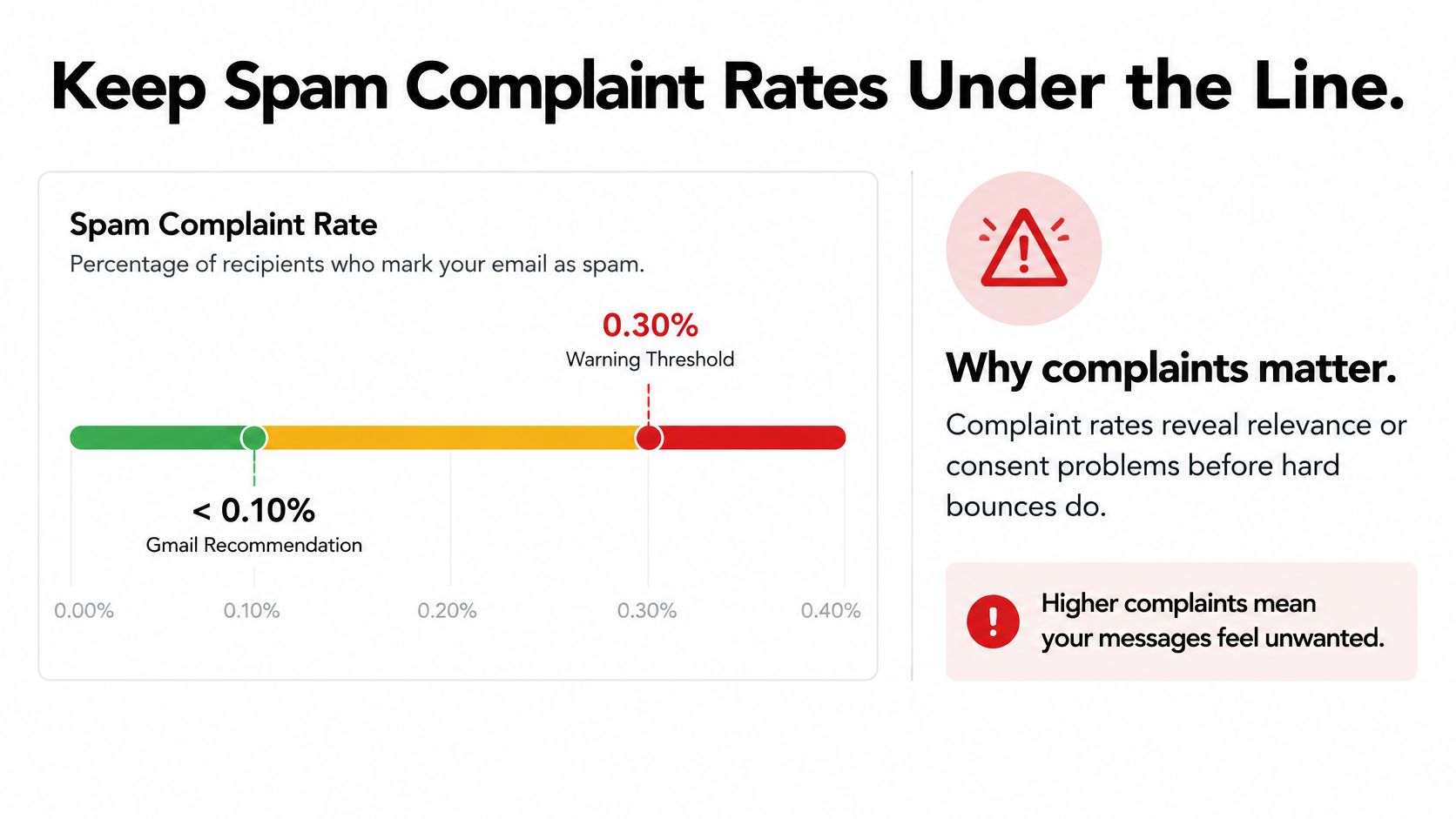
Scale makes the thresholds concrete. On 100,000 Gmail messages, more than 100 complaints crosses the recommended line and 300 or more reaches serious risk territory. Google's spam rate guidance states that Gmail calculates the user-reported spam rate daily in Postmaster Tools, recommends staying below 0.1%, and removes access to delivery mitigations at 0.3% or higher, with eligibility returning only after seven consecutive days below 0.3%.
The Five-Step Complaint Routine
- Verify the domain in Postmaster Tools so the daily rate is visible per sending domain.
- Segment the data by campaign, acquisition source, geography and mailbox provider.
- Suppress immediately, removing complainers and chronically disengaged recipients from the next send.
- Inspect the segment, checking consent language, send frequency and where those addresses came from.
- Release in cohorts, sending to controlled groups while watching the daily rate before each expansion.
Practical rule: Set the internal alert at 0.05%. Action that starts at the enforcement line starts too late.
The classic pitfall is averaging complaints across the whole database. A healthy global rate can hide one toxic segment, such as an old partner list or a new acquisition source, damaging the domain. This is exactly why complaint control belongs inside a broader first party data strategy, where consent and provenance are tracked at collection, not reconstructed after complaints spike.
Clean Your List and Make Unsubscribes Work
| Mail type | Visible opt-out link | One-click List-Unsubscribe header | Promotional content allowed |
|---|---|---|---|
| Marketing | Yes | Yes | Yes |
| Transactional | No | No | No |
List cleaning comes before unsubscribe mechanics, because both target the same risk, which is mailing people who don't want the mail. Remove hard-bounced and never-engaged addresses, re-confirm old opt-ins before mailing them again, and separate recipients who haven't opened in months from active ones. Sending to the smaller, responsive group protects reputation while the dormant group gets a re-confirmation attempt or gets retired.
Unsubscribe setup then splits by mail type. Marketing messages need a visible opt-out link in the body plus a one-click List-Unsubscribe header that mailbox providers surface in their own interface. Transactional messages like order confirmations and password resets need neither, and they must stay purely transactional. Slipping a promotion into a receipt turns a trusted stream into a complaint source.
The legal floor is generous and also misleading. The FTC CAN-SPAM compliance guide requires the opt-out mechanism to keep processing requests for at least 30 days after a send and requires senders to honor each request within 10 business days. Treat that window as a backstop for operational recovery, never as the working deadline.
The Next-Day Setup
Route every unsubscribe request straight into a timestamped suppression list that blocks promotional sends within minutes. A recipient who opts out on Monday and receives another campaign on Wednesday doesn't file a legal claim first. That recipient clicks spam, which costs far more.
Two checks confirm the system works. First, open the raw headers of a live campaign and confirm the List-Unsubscribe header is present, functional and separate from the body link. Second, send one test opt-out from a seed address and confirm it stops receiving promotions within the hour. These mechanics also support a healthier lifecycle marketing strategy, because clean exits keep lifecycle segments honest about who still wants contact.
Warm Up New Domains and IPs Without Burning Them
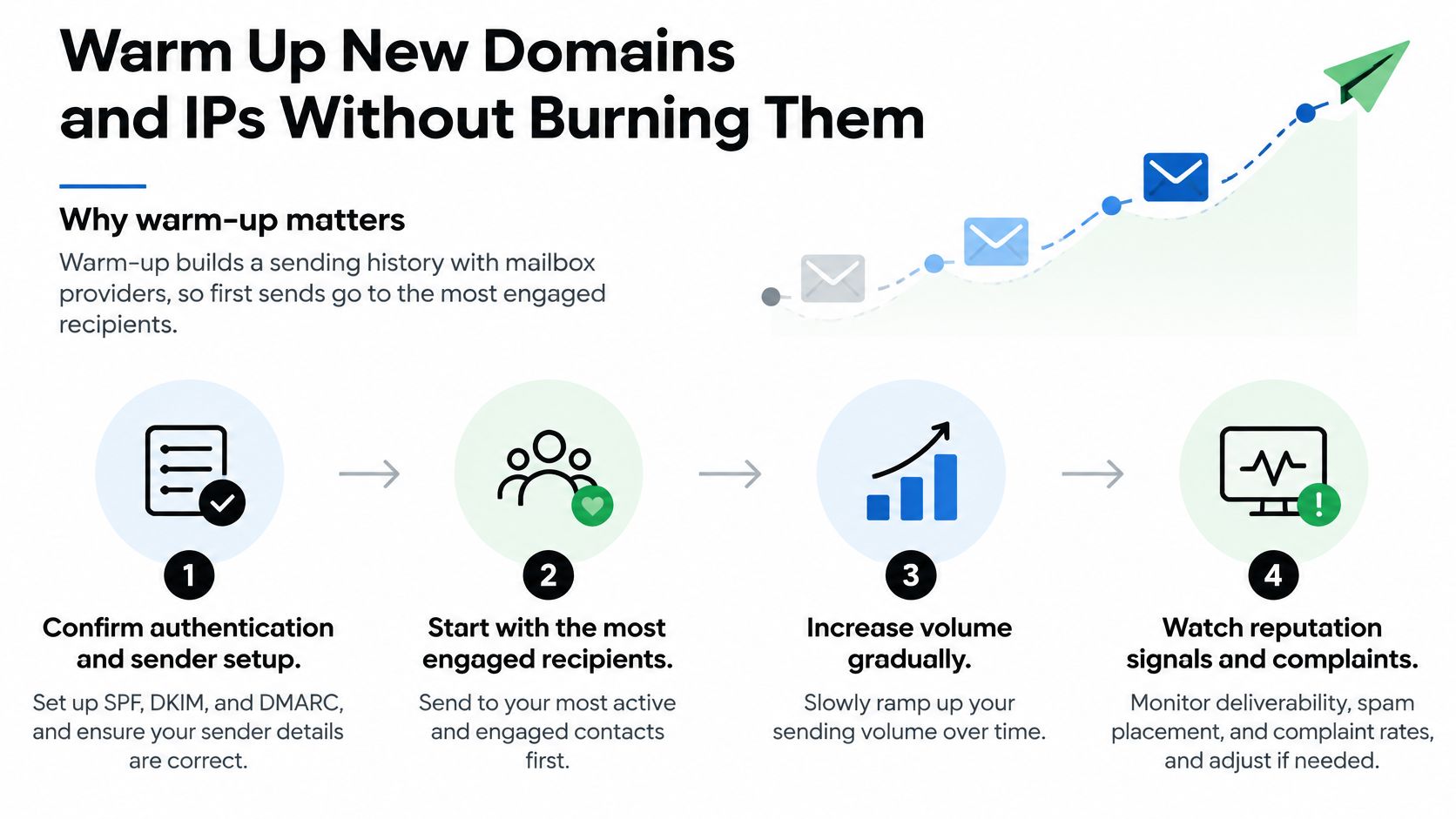
Mailbox providers judge a new domain or IP with no history the way a bank judges a new account. There's no record to trust, so early behaviour carries extra weight. Warm-up exists to build that record deliberately, starting with recipients most likely to open, click and reply.
The Warm-Up Routine
- Confirm the foundation. Authentication and reverse DNS must pass on every stream before the first warm-up send. Warming up a broken configuration just builds a bad history faster.
- Pick the best audience. Select recipients who engaged in the last 30 days, since their opens and clicks generate the positive signals a new sender needs.
- Start small. Send a few hundred messages on day one rather than a symbolic blast. The goal is a clean, readable signal, not volume.
- Raise volume gradually. Increase by roughly 20 to 30 percent a day while complaints stay under the internal alert line, checking Postmaster Tools after each step.
- Hold when signals wobble. If a provider shows deferrals or spam placement rises in seed tests, keep volume flat for a day instead of pushing through. Patience here is cheaper than recovery later.
- Widen the audience last. Add older and less engaged segments only after about two weeks of clean results, one segment at a time.
- Review at every step. Check bounce data and complaint rates before each increase, not after the full ramp finishes.
The most common warm-up failure is impatience dressed up as a launch deadline. A dormant list suddenly receives the full database volume, providers see an unrecognisable sender with a huge spike, and throttling follows immediately. The trade-off is real, since a careful ramp delays a launch by weeks. A burned domain delays it by months.
After four weeks, a healthy warm-up looks boring in the best way. Volume sits at normal campaign levels, seed tests land in the inbox across major providers, bounces stay low and stable, and complaint rates hold comfortably under the alert line. Boring is the goal. Excitement in sender logs is almost always bad news.
Assign Owners and Run the Monitoring Routine
Most email deliverability issues persist because nobody owns the whole sending path. Marketing controls campaigns, engineering controls DNS, customer success hears about missing mail, and an agency runs the sending platform. Each group sees one slice, so problems bounce between teams while placement keeps falling.
The team alignment behind a working routine matters as much as any single check.

| Owner | Checks | Frequency | Trigger to act |
|---|---|---|---|
| Marketing lead | Complaint rate and unsubscribes by campaign | Daily during sends | Rate above 0.05% |
| Engineering or IT | SPF, DKIM, DMARC and DNS records | Weekly and on each new tool | Any new sending platform |
| Customer success | Replies, complaints and missing transactional mail | Weekly | Support tickets about missing mail |
| Agency or vendor | Shared-sender reputation and seed-list tests | Monthly | Placement drop beyond the agreed threshold |
Authentication alone doesn't close the gap, because correctly authenticated mail still lands in spam when complaints, weak engagement, poor list sources or forwarding behaviour work against it. The Mailgun State of Email Deliverability research found that 66.2% of senders reported using both SPF and DKIM, yet 25.7% were unsure whether their organisation had implemented them correctly. Verification beats assumption, every time.
The supporting artefact is a third-party sender inventory with one row per vendor sending under the domain. Each row names the tool, its authentication status, the person who owns its DNS record and the date of its last check. That single document prevents the classic failure where a departed employee's tool keeps sending unauthenticated mail for a year. It also fits naturally beside documented marketing automation workflows, since every automated stream is also a sending stream that needs an owner.
A short walkthrough helps non-technical stakeholders see how these monitoring pieces fit together in practice.
<iframe width="100%" style="aspect-ratio: 16 / 9;" src="https://www.youtube.com/embed/gRAdngEJW9Y" frameborder="0" allow="autoplay; encrypted-media" allowfullscreen></iframe>Close the loop with a stakeholder update leaders can read in one minute. It states current inbox placement, the complaint rate against the healthy line, the single open issue, its owner and its due date. Report deliverability alongside delivery, bounces, complaints and conversions, not as a separate technical score nobody connects to revenue.
Confirm the Fix Holds Before You Scale Volume
Fixing a cause isn't the same as proving recovery. Before returning to full volume, run a go-ahead test and require every check to pass. Fresh message headers should show SPF, DKIM and DMARC passing on every stream, not just the main campaign tool. The daily complaint rate should have stayed in the healthy range for seven consecutive days, bounces should be falling, and seed-list placement should be back in the inbox at Gmail, Outlook and Yahoo.
If any check fails, hold volume and return to whichever part of this playbook owns that failure. Scaling on a partial fix re-injures the domain and resets the recovery clock. Keep the two complaint thresholds distinct in every report, with the lower line as the working target and the higher one as the point where provider mitigations disappear.
Return to full volume in stages, starting with the most engaged segment and adding one segment at a time while checking the daily rate after each addition. Treat each stage like the controlled comparisons used in A/B testing for marketing, where one variable changes and the result gets read before the next change. Then run a 30-day review comparing placement, complaints and unsubscribes against the numbers logged on day one, and write down what changed and why.
One action for this week closes the loop. Book a 30-minute audit of every sending tool against the inventory, and name an owner for each tool that has none.
Deliverability recovery sticks when diagnosis, ownership and testing run as one system across the full funnel, and that's exactly the kind of measurable, experiment-led growth work Sprints & Sneakers builds with B2B and consumer brands. Teams ready to turn invisible email into predictable pipeline can start with a personalised growth scan that pinpoints the single bottleneck holding performance back.
Related articles



Frequently asked questions
Growth marketing, AI and automation, SEO, performance marketing, retention strategies, and sustainable business practices.
Weekly. Subscribe to our newsletter to get new articles straight to your inbox.
Absolutely. Everything we publish is designed to be actionable. Take it, test it, and make it your own.
Yes. We publish experiments with real numbers. What worked, what didn't, and what we learned.
Our growth team — strategists, performance marketers, data specialists, and AI builders who work on client campaigns every day.
We're open to it. Reach out via our contact page with your topic and we'll take a look.